> ## Documentation Index
> Fetch the complete documentation index at: https://docs.automq.com/llms.txt
> Use this file to discover all available pages before exploring further.
# Overview
> Deploy AutoMQ on Kubernetes for scalable, Kafka-compatible data streaming with ease, leveraging managed services like AWS EKS and GCP GKE for optimal performance.
AutoMQ BYOC environments support deployment to managed Kubernetes platforms provided by major cloud providers such as AWS EKS, GCP GKE, Alibaba Cloud ACK. This article introduces the basic concepts, architecture, and constraints of deploying AutoMQ to Kubernetes platforms.
In this article, mentions of AutoMQ product service providers, AutoMQ service providers, and AutoMQ all specifically refer to AutoMQ HK Limited and its subsidiaries.
## Deployment Architecture
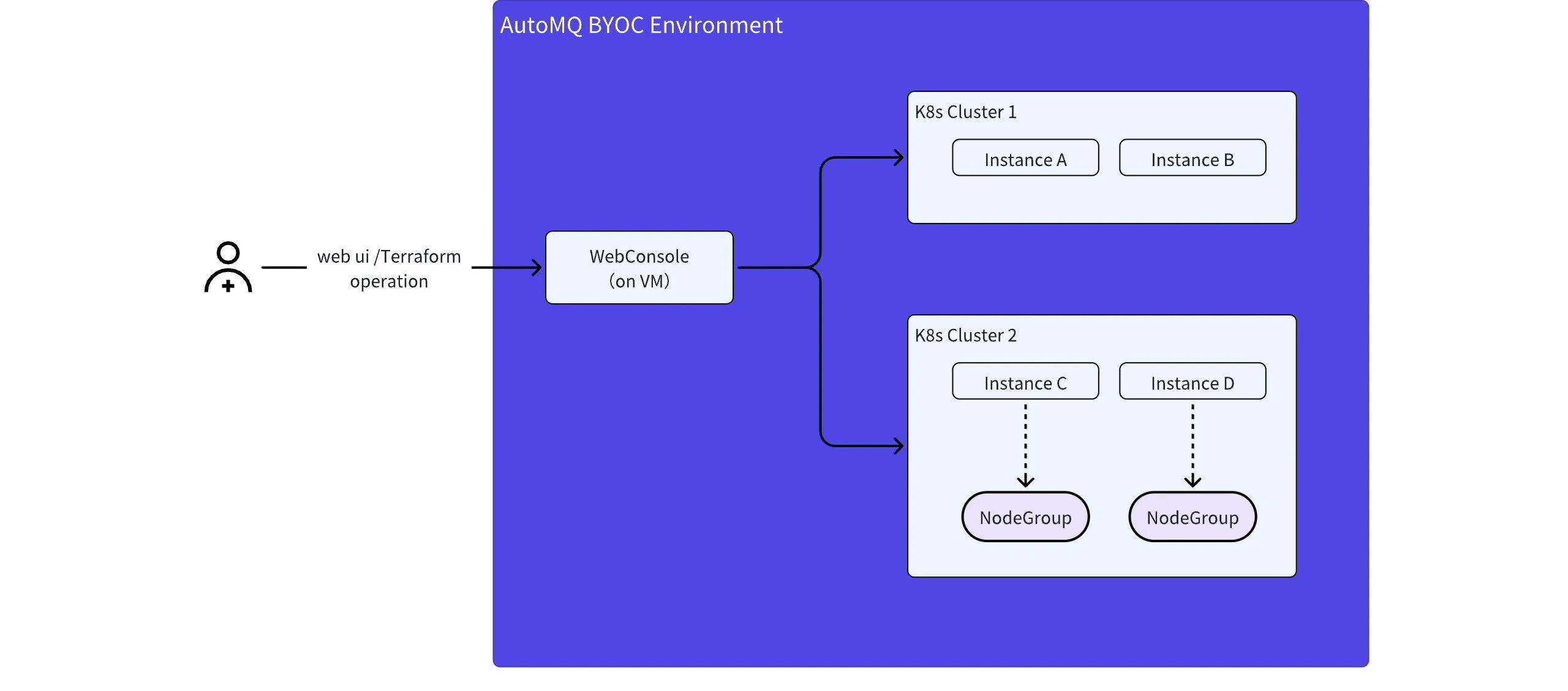
The architecture for deploying AutoMQ BYOC environments to Kubernetes is as follows:
 **Note:**
* In the AutoMQ BYOC environment, the console component is still deployed outside the Kubernetes cluster, typically using a cloud provider's virtual machine. Deployment and installation are carried out by obtaining management permission Config for the Kubernetes cluster.
* Users manage the lifecycle of instances within the environment via the WebUI provided by the AutoMQ console or the Terraform Provider.
* AutoMQ data plane instances (clusters) are deployed to the Kubernetes cluster designated by the user.
* Each environment can support multiple instances simultaneously and allow the deployment of multiple instances across different Kubernetes clusters (under development; only 1 Kubernetes cluster is supported at this time).
## Constraints and Limitations
When deploying AutoMQ on Kubernetes, users need to follow the constraints and limitations outlined below. Improper user operations may lead to deployment and modification failures of the cluster.
### Constraint 1: Users Must Provide a Dedicated Kubernetes Cluster that Meets the Requirements
AutoMQ requires a dedicated Kubernetes cluster that should not be shared with other application systems for the following reasons:
* **Network isolation risk in Kubernetes:** AutoMQ is designed for high-throughput data transmission scenarios and demands high network throughput. Network isolation between different Pods within a Kubernetes cluster is not complete. AutoMQ requires an independent Kubernetes cluster to avoid interference with other business systems of the user.
* **Operations authorization isolation:** The Kubernetes cluster where AutoMQ resides needs to provide operations authorization (granting AutoMQ service provider access to the cluster). AutoMQ requires an independent Kubernetes cluster to prevent unauthorized access by application systems.
Multiple AutoMQ instances (clusters) can be deployed within the Kubernetes cluster. It is generally recommended that Kubernetes clusters are shared among the same business lines under the same VPC.
### Constraint 2: Users Must Provide Dedicated Node Pools (node Groups) that Meet Specific Requirements, Including Specified Instance Types and Ensuring Node Availability.
AutoMQ requires users to provide dedicated node pools (referred to as node groups by AWS), and when creating instances through the AutoMQ console, it checks whether the provided node pools meet the necessary requirements. The specific requirements are as follows:
AutoMQ requires dedicated node pools; therefore, users need to create an additional node pool for the Kubernetes cluster to run Kubernetes system components.
* **Add exclusive taint to the node pool:** To prevent other workloads in the Kubernetes cluster from occupying resources on the AutoMQ exclusive nodes, it is necessary to add taints to the AutoMQ exclusive node pool. **The taint key is dedicated, and the value is automq.**
* **Compliant Machine Types:** AutoMQ selects corresponding network-optimized virtual machine instances from different cloud providers to offer the best cluster performance. When creating node pools, users must select compliant machine types. Refer to the table below for specific machine information:
| **Cloud Provider**
**Note:**
* In the AutoMQ BYOC environment, the console component is still deployed outside the Kubernetes cluster, typically using a cloud provider's virtual machine. Deployment and installation are carried out by obtaining management permission Config for the Kubernetes cluster.
* Users manage the lifecycle of instances within the environment via the WebUI provided by the AutoMQ console or the Terraform Provider.
* AutoMQ data plane instances (clusters) are deployed to the Kubernetes cluster designated by the user.
* Each environment can support multiple instances simultaneously and allow the deployment of multiple instances across different Kubernetes clusters (under development; only 1 Kubernetes cluster is supported at this time).
## Constraints and Limitations
When deploying AutoMQ on Kubernetes, users need to follow the constraints and limitations outlined below. Improper user operations may lead to deployment and modification failures of the cluster.
### Constraint 1: Users Must Provide a Dedicated Kubernetes Cluster that Meets the Requirements
AutoMQ requires a dedicated Kubernetes cluster that should not be shared with other application systems for the following reasons:
* **Network isolation risk in Kubernetes:** AutoMQ is designed for high-throughput data transmission scenarios and demands high network throughput. Network isolation between different Pods within a Kubernetes cluster is not complete. AutoMQ requires an independent Kubernetes cluster to avoid interference with other business systems of the user.
* **Operations authorization isolation:** The Kubernetes cluster where AutoMQ resides needs to provide operations authorization (granting AutoMQ service provider access to the cluster). AutoMQ requires an independent Kubernetes cluster to prevent unauthorized access by application systems.
Multiple AutoMQ instances (clusters) can be deployed within the Kubernetes cluster. It is generally recommended that Kubernetes clusters are shared among the same business lines under the same VPC.
### Constraint 2: Users Must Provide Dedicated Node Pools (node Groups) that Meet Specific Requirements, Including Specified Instance Types and Ensuring Node Availability.
AutoMQ requires users to provide dedicated node pools (referred to as node groups by AWS), and when creating instances through the AutoMQ console, it checks whether the provided node pools meet the necessary requirements. The specific requirements are as follows:
AutoMQ requires dedicated node pools; therefore, users need to create an additional node pool for the Kubernetes cluster to run Kubernetes system components.
* **Add exclusive taint to the node pool:** To prevent other workloads in the Kubernetes cluster from occupying resources on the AutoMQ exclusive nodes, it is necessary to add taints to the AutoMQ exclusive node pool. **The taint key is dedicated, and the value is automq.**
* **Compliant Machine Types:** AutoMQ selects corresponding network-optimized virtual machine instances from different cloud providers to offer the best cluster performance. When creating node pools, users must select compliant machine types. Refer to the table below for specific machine information:
| **Cloud Provider**
| **Allowed Machine Types List**
|
| ------------------------ | ----------------------------------------------------------------------------------------------------------------------------------------------------------------------------------- |
| AWS
| Small Instance Types:
- Series: r6in
- Instance Types: r6in.large, 2C16G
- Disk: GP3 EBS, 40GB
- Performance: Supports 4 AKU per machine
|
| Google Cloud
| Small Machine Types:
- Series: N2D
- Type: n2d-standard-4, 4C16G
- Disk: SSD persistent disk, 40GB
- Performance: Supports 5 AKU per machine
|
| Azure
| Specification Model:
- Series: D4V5
- Model: `Standard D4as v5` , 4C16G
- Performance: Supports 5AKU per node
|
* **Node Pool Role Authorization Requirements:** AutoMQ clusters need to access services such as object storage and EBS during operation. Therefore, users must grant appropriate roles and permissions to the node pools and ensure that these authorizations are not modified or revoked.
* **Zone (Subnet) Requirements:** AutoMQ supports both single-zone and three-zone instances. Hence, users need to create corresponding node pools for single-zone and three-zone instances, and they cannot be mixed.
Example: A user needs to create three AutoMQ instances, namely Instance 1 (Zone A), Instance 2 (Zone B), and Instance 3 (Zones A, B, and C). The user needs to create three node pools, selecting Zone A, Zone B, and Zones A+B+C respectively.