> ## Documentation Index
> Fetch the complete documentation index at: https://docs.automq.com/llms.txt
> Use this file to discover all available pages before exploring further.
# Manage Integrations
> Optimize AutoMQ data exchange with seamless integrations for Prometheus, Apache Kafka, and CloudWatch. Achieve cloud-native scalability and cost-efficient monitoring.
During the use of the AutoMQ Cloud product, users can achieve data exchange between instances within the environment and external systems through the integration features. This article introduces the use of the integration features.
In this article, references to the AutoMQ product service provider, AutoMQ service provider, and AutoMQ specifically refer to AutoMQ HK Limited.
## Integration Types
AutoMQ Cloud supports the following integration features:
| **Integration Type**
| **Data Type**
| **Applicable Scenarios**
|
| ---------------------------- | -------------------------------- | ---------------------------------------------------------------------------------------------------------------------------------------------------------------------------------------------------------------------------------------------------------------------------------------------------------------------------------------------------------------------------------------------------------------- |
| Prometheus RemoteWrite
| | - Scenario: Metrics data generated in real-time by AutoMQ Kafka instances can be transmitted to a user-defined Prometheus service through the integration feature, enabling custom observability dashboards and monitoring alerts.
- Constraints: Users need to provide the Prometheus service that supports writing Metrics via the RemoteWrite protocol and ensure network connectivity.
|
| Apache Kafka
| | - Scenario: AutoMQ supports data migration from external Apache Kafka, allowing external Kafka clusters to be migrated to AutoMQ instances.
- Constraints: The user-provided Apache Kafka source cluster needs to be functioning properly and ensure network connectivity.
|
| CloudWatch
| | - Scenario: Metrics data generated in real-time by the AutoMQ Kafka instance can be written to the user's AWS CloudWatch service through integration, enabling subsequent custom observability dashboards and monitoring alerts.
- Constraints: Limited to the AWS cloud environment.
|
## Creating Prometheus Integration
### Prerequisites
The principle behind the Prometheus integration feature in AutoMQ Cloud is that each data node in the cluster directly writes metrics data to the Prometheus HTTP endpoint using the RemoteWrite protocol. Therefore, the provided Prometheus service must have RemoteWrite enabled.
#### Integrating with a Self-Built Prometheus Service
This feature requires the user's Prometheus service to meet the following conditions:
* During cluster deployment, the RemoteWrite configuration must be enabled in the startup command.
#### Integration with Cloud Providers' Prometheus Services
If users are utilizing a managed service provided by Public Cloud providers, it is recommended to consult their technical support. For example, Alibaba Cloud's Prometheus service offers out-of-the-box support for RemoteWrite.
### Operation Steps
You can create a Prometheus integration by following these steps:
1. **Navigate to the integration list page and create a new integration.** Users should access the environment console, click on **Integrations** in the left navigation bar to enter the integration list page. Click on **Create Integration**, and follow the prompts to enter the following information to complete the creation.
| **Parameter**
| **Example Value**
|
| -------------------------------- | ----------------------------------------------------------------------------------------------------------------------------------------------------------------------------------------------------------------------------------------------------------------------------------------------------------------------------------------------- |
| Integration Name
| Fill in the alias with distinguishable names for the integration configuration items. For specific restrictions, refer to [Restrictions▸](/automq-cloud/overview/restrictions).
|
| Integration Type
| Select **Prometheus Service**
|
| Prometheus RemoteWrite Endpoints | AutoMQ Cloud uses the RemoteWrite protocol to directly send metrics data from instances within the environment to a user-specified Prometheus cluster. The user must provide the necessary interface for this protocol. |
| Authentication Types | AutoMQ Prometheus integration supports various authentication types:
- No Authentication: Anonymous access.
- BasicAuth: Authentication using static username and password.
- BearerToken: Authentication using a static token.
- AWS SigV4: Suitable for AWS-managed Prometheus, authenticated via IAM.
|
| Authentication Information | If ACL authentication is enabled on the Prometheus service, you will need to configure the relevant token, username and password, or IAM authorization. |
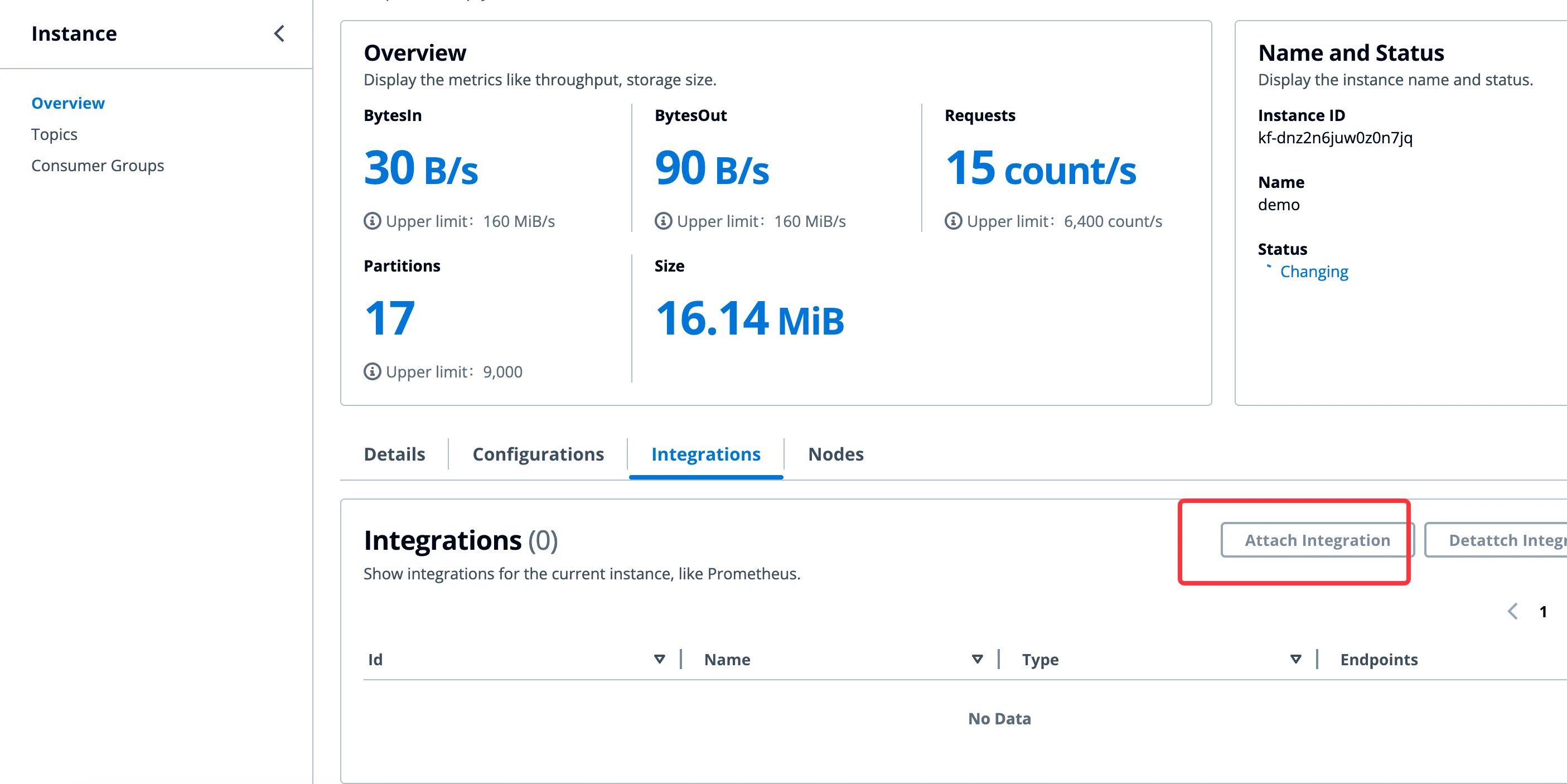
2. **Navigate to the instance details page and reference the integration configuration.** For instances that require integration configuration, navigate to the respective instance details page, reference the integration item created in the first step, enable the configuration, and subsequently check if data is being reported in the Prometheus service.
 For detailed metrics data definitions provided by AutoMQ Cloud, please refer to [Monitoring & Alert via Prometheus▸](/automq-cloud/monitoring-alert/monitoring-alert-via-prometheus).
## Creating Apache Kafka Integration
### Prerequisites
The principle of integrating Apache Kafka in AutoMQ Cloud is to use the Kafka Connector component to connect with external Kafka clusters (including other Kafka-compatible versions) to achieve real-time synchronization and migration of messages and other data. Therefore, it is necessary to ensure:
* The external Apache Kafka cluster version is higher than 0.9.x.
* The network between the external Kafka cluster and AutoMQ is unimpeded.
### Operation Steps
Users can create an Apache Kafka integration by following these steps:
1. **Navigate to the integration list page and create a new integration.** Users should access the environment console, click on **Integrations** in the left navigation bar to enter the integration list page. Click on **Create Integration**, and follow the prompts to enter the following information to complete the creation.
| **Parameter**
For detailed metrics data definitions provided by AutoMQ Cloud, please refer to [Monitoring & Alert via Prometheus▸](/automq-cloud/monitoring-alert/monitoring-alert-via-prometheus).
## Creating Apache Kafka Integration
### Prerequisites
The principle of integrating Apache Kafka in AutoMQ Cloud is to use the Kafka Connector component to connect with external Kafka clusters (including other Kafka-compatible versions) to achieve real-time synchronization and migration of messages and other data. Therefore, it is necessary to ensure:
* The external Apache Kafka cluster version is higher than 0.9.x.
* The network between the external Kafka cluster and AutoMQ is unimpeded.
### Operation Steps
Users can create an Apache Kafka integration by following these steps:
1. **Navigate to the integration list page and create a new integration.** Users should access the environment console, click on **Integrations** in the left navigation bar to enter the integration list page. Click on **Create Integration**, and follow the prompts to enter the following information to complete the creation.
| **Parameter**
| **Example Value**
|
| ---------------------- | ------------------------------------------------------------------------------------------------------------------------------------------------------------------------------------------------------------------------------------------------------------------------------ |
| Integration Name
| Fill in the alias with distinguishable names for the integration configuration items. For specific restrictions, refer to [Restrictions▸](/automq-cloud/overview/restrictions).
|
| Integration Type
| Select **Apache Kafka Service**
If the source cluster is a cloud vendor-managed Kafka or any other Kafka distribution, it is also supported.
|
| Access Protocol
| Client access protocol for connecting to external Kafka clusters. Currently supported protocols:
- PLAINTEXT: Access external Kafka clusters using unauthenticated channels.
- SASL\_PLAINTEXT: Access external Kafka clusters using SASL protocol.
|
## Creating CloudWatch Integration
### Prerequisites
The principle of AutoMQ Cloud's CloudWatch integration function is to write the metrics data of the AutoMQ cluster into the user-specified CloudWatch Namespace via the CloudWatch API.
### Operation Steps
Users can create a CloudWatch integration by following these steps:
1. **Navigate to the integration list page and create a new integration.** Users should access the environment console, click on **Integrations** in the left navigation bar to enter the integration list page. Click on **Create Integration**, and follow the prompts to enter the following information to complete the creation.
| **Parameter**
| **Example Value**
|
| ---------------------- | --------------------------------------------------------------------------------------------------------------------------------------------------------- |
| Integration Name
| Fill in distinctive aliases for integration configuration items; see specific restrictions in [Restrictions▸](/automq-cloud/overview/restrictions).
|
| Integration Type
| Select **CloudWatch Service**
|
| Namespace
| Follow CloudWatch naming conventions and enter a custom Namespace. Metrics data will be written to the specified Namespace.
|