> ## Documentation Index
> Fetch the complete documentation index at: https://docs.automq.com/llms.txt
> Use this file to discover all available pages before exploring further.
# Overview
> AutoMQ Cloud offers scalable, Kafka-compatible message queues with identity recognition and RBAC permissions, ensuring secure account access for both members and services.
AutoMQ Cloud supports identity recognition and RBAC (Role-Based Access Control) permissions. This article introduces the basic concepts of accounts in the AutoMQ Cloud product system.
## Account Types
AutoMQ Cloud offers two types of accounts: **Member Account** and **Service Account**. Their definitions and differences are as follows:
| **Account Type**
| **Roles and Differences**
|
| ------------------------- | -------------------------------------------------------------------------------------------------------------------------------------------------------------------------------------------------------------------------------------------------------------------------------------------------------------------------------------------------- |
| **Member Account**
| - **Scenario:** A Member Account corresponds to an individual, typically held and used by a company employee.
- **Access:** Access AutoMQ Cloud through the environment console WebUI.
- **Identity Recognition:** Username and password login authentication.
|
| **Service Account**
| - **Scenario:** A Service Account is used only for applications and API integration, generally configured within application code.
- **Access:** Service Accounts typically access AutoMQ Cloud via APIs, Terraform, etc.
- **Identity Recognition:** Access Key Id and Secret Access Key, verified through signature.
|
## Member Account
### Definition
Member accounts are system-generated by default, manually created by existing environment members, or automatically created through enterprise SSO login, serving as credentials for environment-level operations.
Member accounts support multiple roles based on the required permission scope, including Admin, Operator, and Viewer roles.
### Creation Method
* **Local Type:** The initial Admin member of each environment is automatically created by the system upon environment creation. Subsequent members can be manually created by Admin members.
* **SSO Type:** AutoMQ supports configuring enterprise Identity Provider (IDP) services. Environment members of the SSO type are created through SSO login.
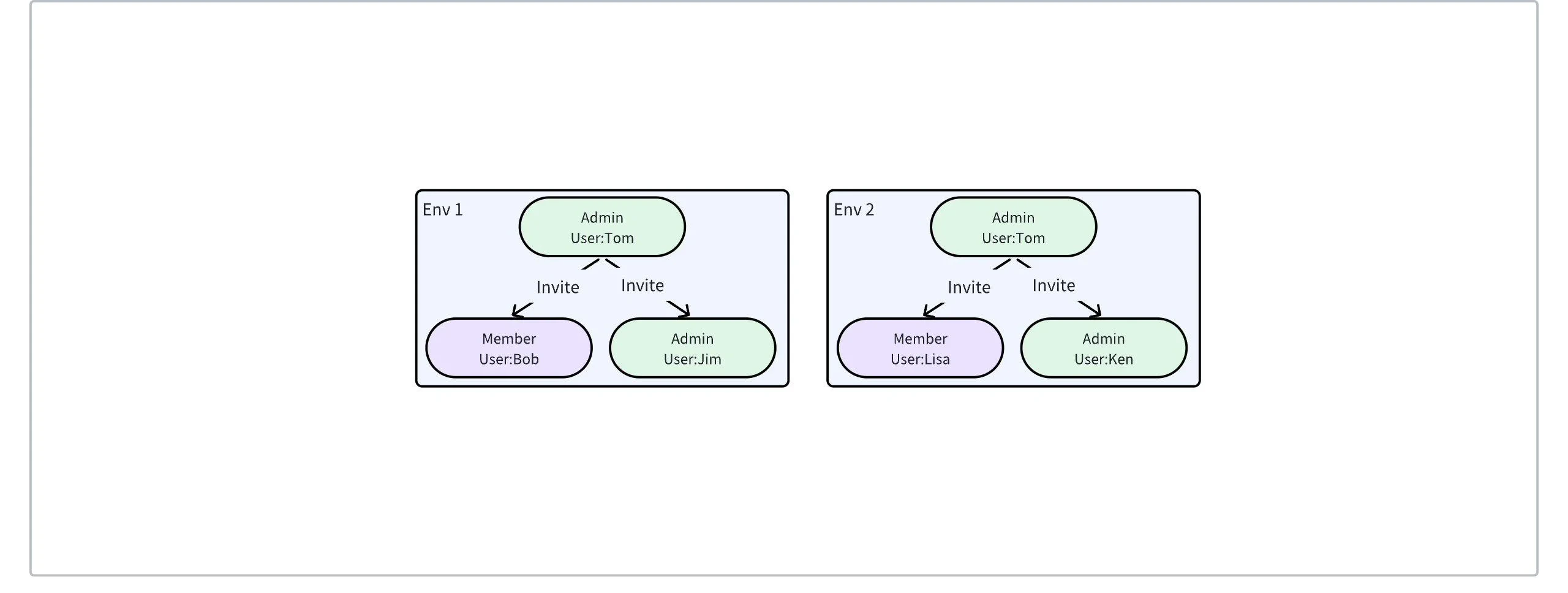
### Relationship Between Environment and Environment Members
When a new environment is created, the system will automatically initialize and create an Admin role member for the current environment. Subsequent members are then created by the initial Admin member.
 ## Service Account
### Definition
Service accounts are provided by AutoMQ Cloud for external systems to access AutoMQ via APIs and application integration. Service accounts do not have login passwords and cannot be operated through the WebUI.
### Creation Method
Service accounts can be created by member accounts in the AutoMQ Console or via API.
## RBAC Permission Control
AutoMQ Cloud includes both **member accounts** and **service accounts**, and both support RBAC (Role-Based Access Control). The system comes with several predefined permission roles, each offering different scopes of operational permissions. An Admin role account conducts authorization operations, assigning roles to other accounts.
For information on RBAC control, please refer to the document [Role-Based Access Control▸](/automq-cloud/manage-identities-and-access/role-based-access-control).
## Service Account
### Definition
Service accounts are provided by AutoMQ Cloud for external systems to access AutoMQ via APIs and application integration. Service accounts do not have login passwords and cannot be operated through the WebUI.
### Creation Method
Service accounts can be created by member accounts in the AutoMQ Console or via API.
## RBAC Permission Control
AutoMQ Cloud includes both **member accounts** and **service accounts**, and both support RBAC (Role-Based Access Control). The system comes with several predefined permission roles, each offering different scopes of operational permissions. An Admin role account conducts authorization operations, assigning roles to other accounts.
For information on RBAC control, please refer to the document [Role-Based Access Control▸](/automq-cloud/manage-identities-and-access/role-based-access-control).