> ## Documentation Index
> Fetch the complete documentation index at: https://docs.automq.com/llms.txt
> Use this file to discover all available pages before exploring further.
# Executing Migration
> From Apache Kafka to AutoMQ: Migrate data without loss and maintain consumption progress. Also ensure a smooth transition for producers and consumers, achieving efficient data migration.
With the [Prerequisites▸](/automq-cloud/migrate-to-automq/prerequisites) completed, you can proceed with the subsequent migration process. This document provides a detailed overview of the strategies and implementation procedures for migrating from Apache Kafka to AutoMQ.
## Migration plan
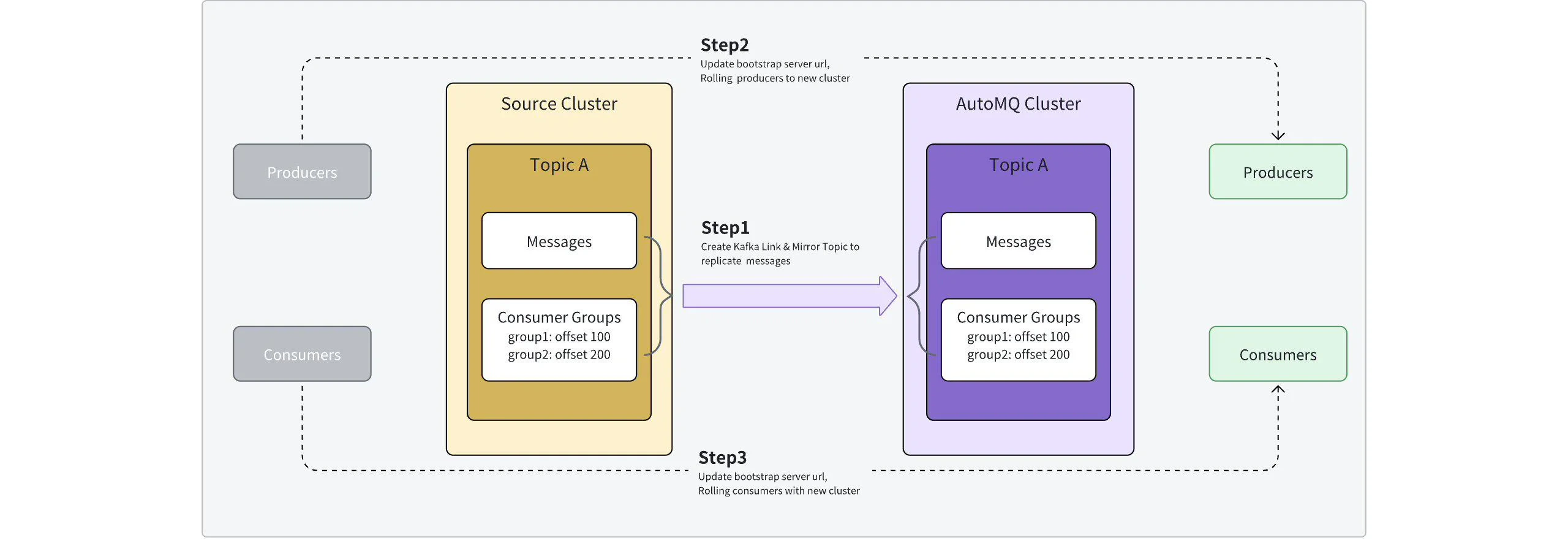
Using Kafka Linking to migrate from Apache Kafka® to AutoMQ, the following tasks should be considered:
* **Message data synchronization**: Kafka stores historical data of both consumed and unconsumed messages. Migrating clusters must ensure that message data is replicated to the new cluster as needed, without losing any messages.
* **Producer switching**: In addition to data synchronization, the migration process requires switching producer applications at an appropriate time so that producers connect to the target cluster to produce new messages.
* **Consumer switching**: In addition to data synchronization, the migration process requires switching consumer applications at an appropriate time so that consumers connect to the target cluster and continue consuming messages from the previous consumption progress.
Refer to the following flowchart for the overall migration plan:
 ## Steps
### Step 1: Create a Kafka Link and start synchronizing data
After completing the [Prerequisites▸](/automq-cloud/migrate-to-automq/prerequisites), the source cluster, target cluster, and the scope of Topics and Consumer Groups to be migrated have been clearly defined. The next step is to start creating the migration task.
Create a **Kafka Link** by clicking on **Target Instance >> Kafka Links** and filling in the relevant parameters as guided.
| **Parameter Name**
## Steps
### Step 1: Create a Kafka Link and start synchronizing data
After completing the [Prerequisites▸](/automq-cloud/migrate-to-automq/prerequisites), the source cluster, target cluster, and the scope of Topics and Consumer Groups to be migrated have been clearly defined. The next step is to start creating the migration task.
Create a **Kafka Link** by clicking on **Target Instance >> Kafka Links** and filling in the relevant parameters as guided.
| **Parameter Name**
| **Description**
|
| ---------------------------------- | ------------------------------------------------------------------------------------------------------------------------------------------------------------------------------------------------------------------------------------------------------------------------------------------------------------------------------------------------------------------------------------------------------ |
| **Kafka Link Id**
| - Meaning: Used to represent a group of migration tasks, generally recommended to be a short and recognizable name.
- Constraint: Supports only English uppercase and lowercase letters, numbers, hyphens (-), and underscores (\_).
|
| **Source Cluster**
| Specify the source cluster to be migrated. Here, fill in the Bootstrap address and ACL identity parameters of the source cluster.
|
| **Target Cluster**
| Specify the target cluster for the migration. Here, select the already created AutoMQ instance.
|
| **Starting Sync Position**
| Specifies the initial synchronization position after the migration task starts. The following options are supported:
- **From Latest Position:** Kafka Linking only replicates new messages generated subsequently to the target cluster. This mode is suitable for cold read sensitivity scenarios where migration needs to catch up with both clusters from the current moment.
|
| **Sync Topic List**
| Select several Source Topics from the source cluster. Kafka Linking will create a one-to-one mapped Mirror Topic in the target instance.
If the target instance already has the current Topic, the Mirror Topic cannot be created.
|
| **Sync Consumer Group List**
| Select several Consumer Groups from the source cluster. Kafka Linking will create a one-to-one mapped Consumer Group on the target instance.
|
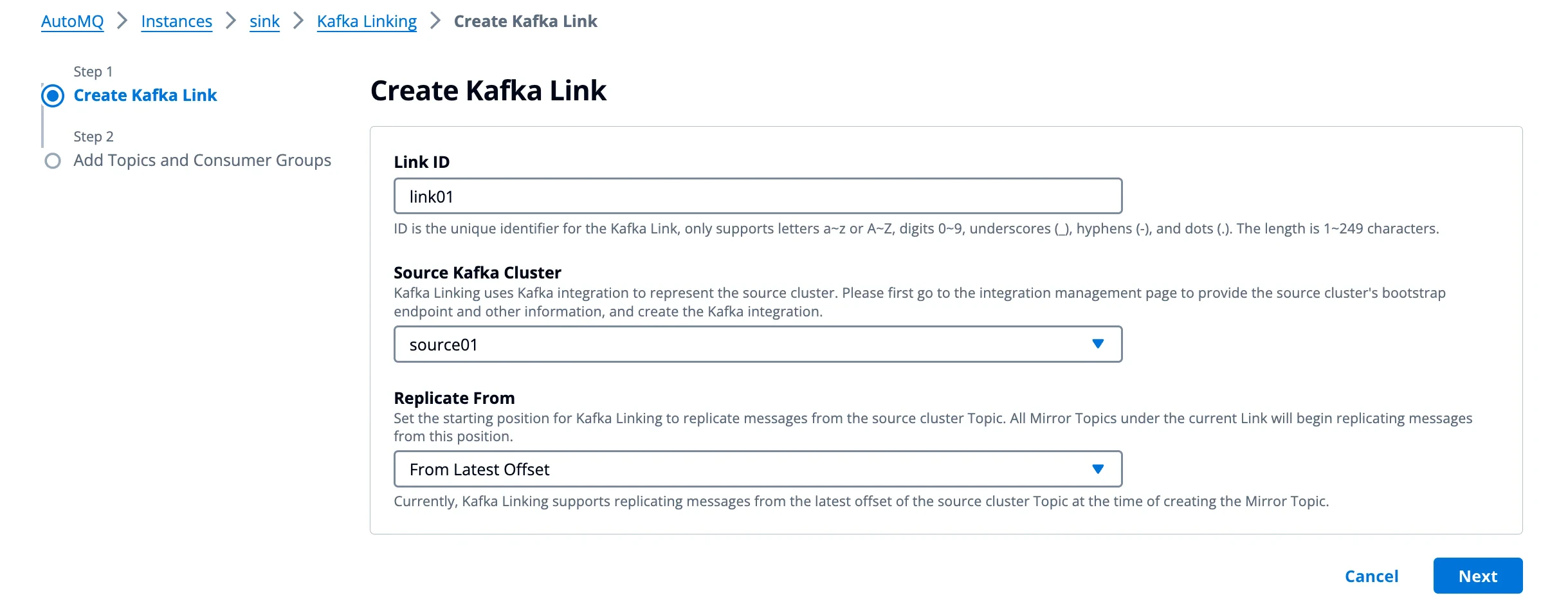 Select the target topic and Consumer Group.
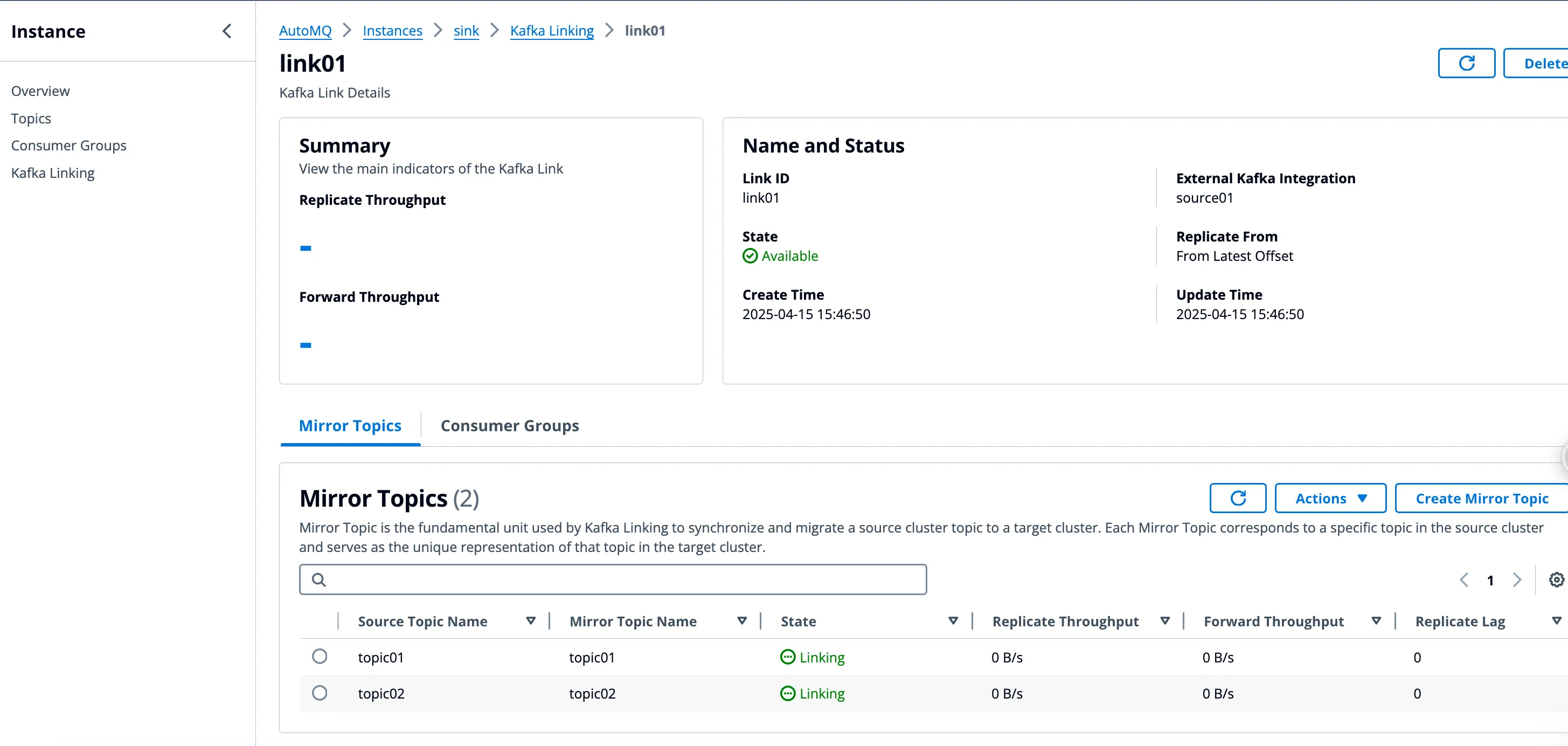
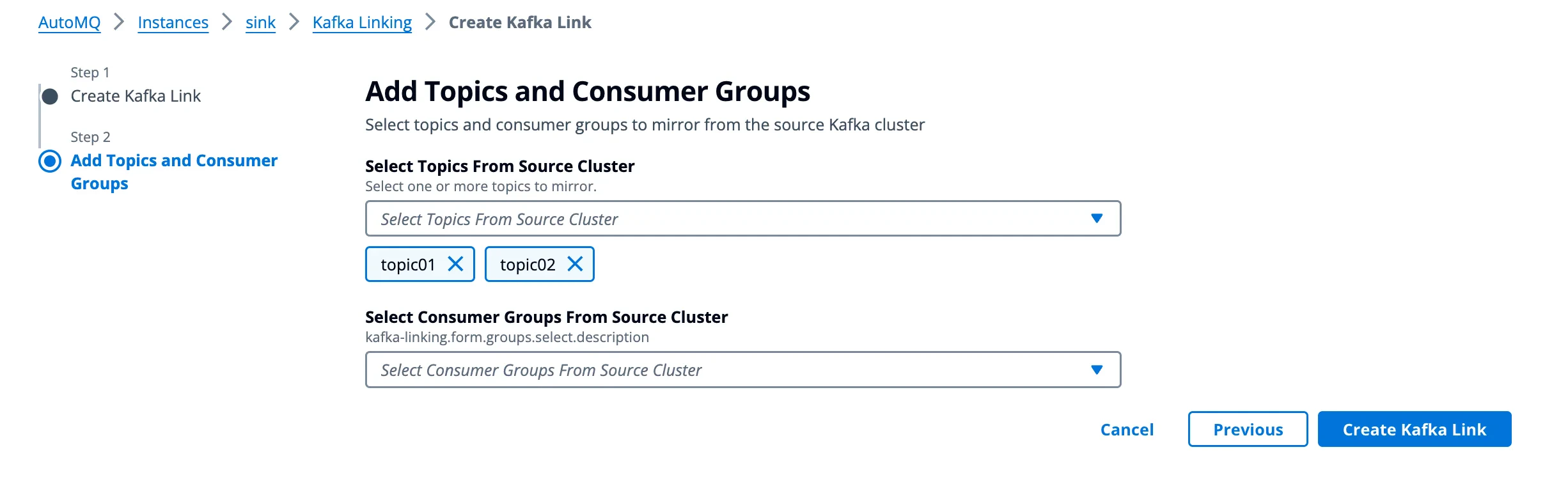 After creation, you can enter the Kafka Link details to check that the specified Topic and Group have already entered the **synchronization** status. Once Kafka Link is created, it also supports adding new Topics and Consumer Groups. You can add the required business resources for migration as needed.
If you delete Mirror Topics or Consumer Groups in Kafka Link, the corresponding Topics and Consumer Groups will be deleted from the target cluster (AutoMQ instance). This operation cannot be undone; you will need to recreate them afterward.
After creation, you can enter the Kafka Link details to check that the specified Topic and Group have already entered the **synchronization** status. Once Kafka Link is created, it also supports adding new Topics and Consumer Groups. You can add the required business resources for migration as needed.
If you delete Mirror Topics or Consumer Groups in Kafka Link, the corresponding Topics and Consumer Groups will be deleted from the target cluster (AutoMQ instance). This operation cannot be undone; you will need to recreate them afterward.
 ### Step 2: Switch producers and consumers, execute migration process
When the Kafka Link is created, users need to update the Producer and Consumer configurations, switching the Producer and Consumer from the source cluster to the target cluster. This mainly involves the following three operations:
* **Producer Cutover:** Update the producer's access parameters to point to the target cluster.
* **Consumer Cutover:** Update the consumer's access parameters to point to the target cluster.
* **Promote Mirror Topic Status:** In the AutoMQ console, select the Mirror Topic for status promotion. The promotion operation essentially controls the Kafka Linking component to stop proxying Producer write traffic and replicating data from the source cluster.
Specific steps for switching the Producer and Consumer stream can be found below:
#### Phase 1: Switch the producer to the target cluster
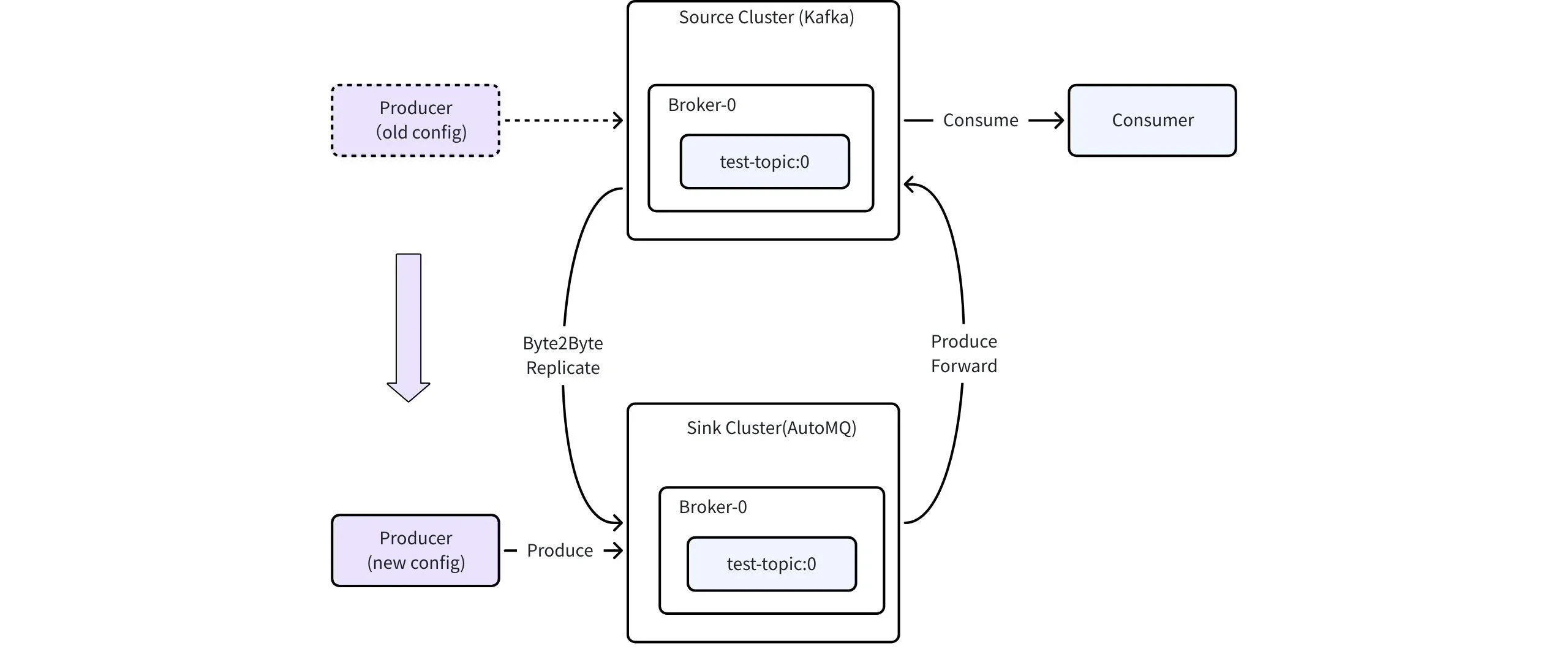
During the migration process, first switch the Producer's access configuration so that the Producer connects to the target cluster (AutoMQ instance). The traffic topology during the switching process is shown in the figure below:
### Step 2: Switch producers and consumers, execute migration process
When the Kafka Link is created, users need to update the Producer and Consumer configurations, switching the Producer and Consumer from the source cluster to the target cluster. This mainly involves the following three operations:
* **Producer Cutover:** Update the producer's access parameters to point to the target cluster.
* **Consumer Cutover:** Update the consumer's access parameters to point to the target cluster.
* **Promote Mirror Topic Status:** In the AutoMQ console, select the Mirror Topic for status promotion. The promotion operation essentially controls the Kafka Linking component to stop proxying Producer write traffic and replicating data from the source cluster.
Specific steps for switching the Producer and Consumer stream can be found below:
#### Phase 1: Switch the producer to the target cluster
During the migration process, first switch the Producer's access configuration so that the Producer connects to the target cluster (AutoMQ instance). The traffic topology during the switching process is shown in the figure below:
 **Operations steps:**
* The producer updates the access parameters in batches and restarts the application, redirecting the production traffic to the designated AutoMQ instance.
**Expected Outcome:**
* Production traffic is migrated to the target instance in phases, ensuring no downtime or disruption in production traffic.
* Consumers in the source cluster continue to consume all messages without interruption.
* Messages in the source cluster are synchronized to AutoMQ using replication tasks.
**Rollback Operation:**
* Producer rollback configuration: switch back to the source cluster.
#### Phase 2: Switch the consumer to the target cluster
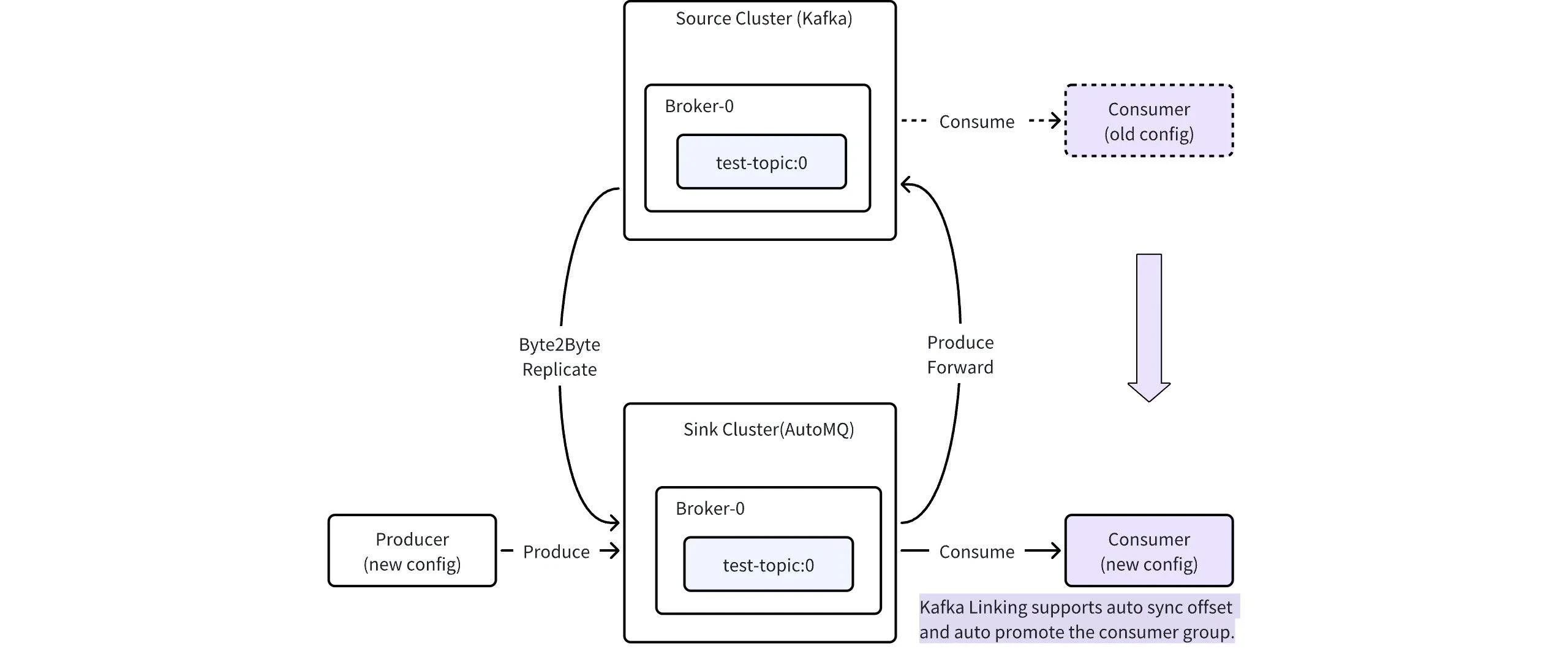
The second stage involves switching the Consumer's access configuration, allowing the Consumer to connect to the target cluster (AutoMQ instance). The traffic topology during the switch is shown in the figure below:
**Operations steps:**
* The producer updates the access parameters in batches and restarts the application, redirecting the production traffic to the designated AutoMQ instance.
**Expected Outcome:**
* Production traffic is migrated to the target instance in phases, ensuring no downtime or disruption in production traffic.
* Consumers in the source cluster continue to consume all messages without interruption.
* Messages in the source cluster are synchronized to AutoMQ using replication tasks.
**Rollback Operation:**
* Producer rollback configuration: switch back to the source cluster.
#### Phase 2: Switch the consumer to the target cluster
The second stage involves switching the Consumer's access configuration, allowing the Consumer to connect to the target cluster (AutoMQ instance). The traffic topology during the switch is shown in the figure below:
 **Operations steps:**
* Consumers modify their connection parameters in batches and restart the application to connect to the AutoMQ instance.
* Kafka Linking automatically detects when Consumer Group switchovers are completed and promotes the Consumer Group, allowing consumers to continue consumption from the new cluster.
**Before switching Consumers, the following conditions should be met**
Ensure that the Consumer's consumption offset is greater than or equal to the minimum offset of messages synchronized on the current Topic in the AutoMQ instance to avoid any messages becoming unconsumable post-switch.
Example: If the Consumer in the source cluster has a consumption offset of 100 for Partition X, and the minimum offset in Partition X of the AutoMQ instance is less than or equal to 100, then the switch can be made; otherwise, the Consumer should continue to wait until the condition is satisfied.
**Expected Outcome:**
* Production traffic remains in the same state as the previous phase, continuing to proxy back to the source cluster and synchronize to the target cluster.
* The Consumer Group will continue to consume from the offsets of the source cluster and will not be affected.
**Rollback Operation:**
* For the consumer rollback configuration, switch back to the source cluster.
Since the consumption offsets of the source cluster will not be updated automatically, it is recommended to reset the offsets before rolling back to avoid potential duplicate consumption.
#### Phase 3: Promote Mirror Topic status
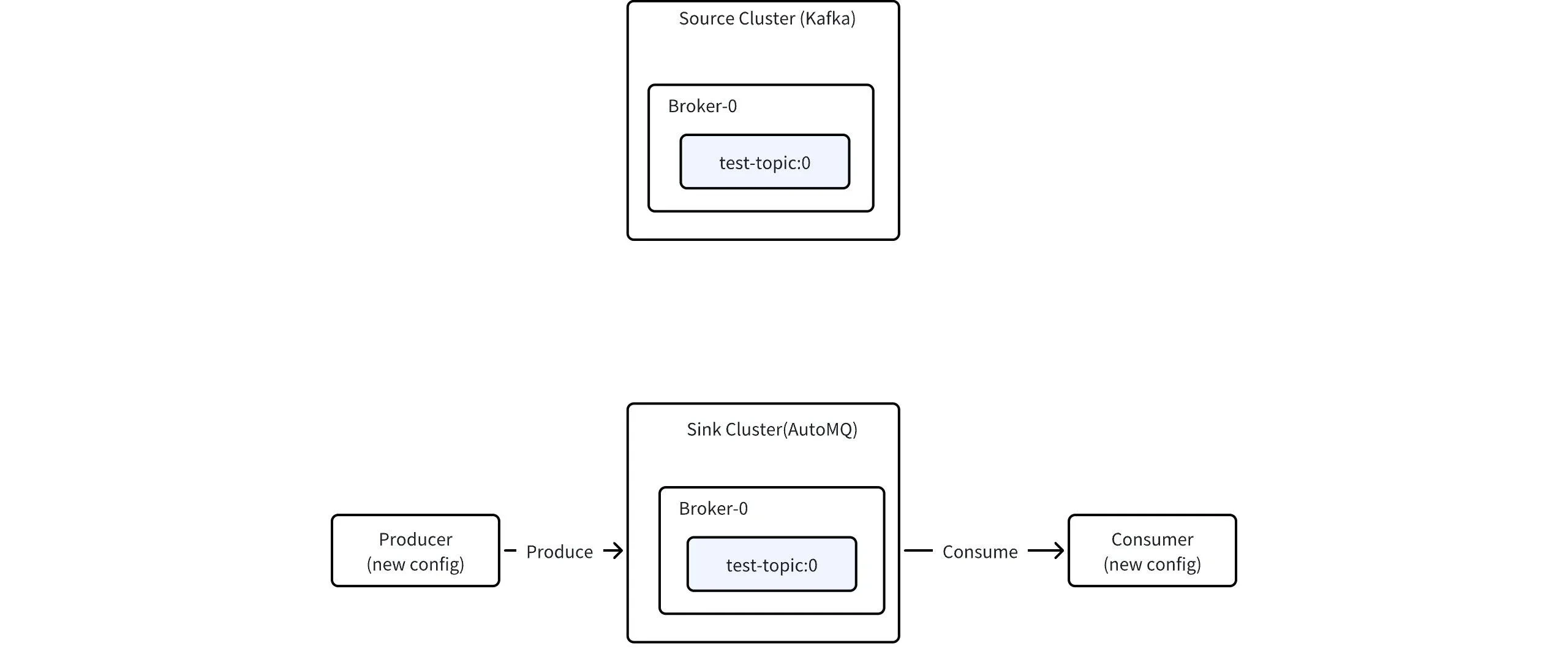
Once all Producers and Consumers have successfully switched and are functioning as expected, you can elevate the status of the Mirror Topic, stop the traffic proxy, and synchronization.
**Operations steps:**
* Consumers modify their connection parameters in batches and restart the application to connect to the AutoMQ instance.
* Kafka Linking automatically detects when Consumer Group switchovers are completed and promotes the Consumer Group, allowing consumers to continue consumption from the new cluster.
**Before switching Consumers, the following conditions should be met**
Ensure that the Consumer's consumption offset is greater than or equal to the minimum offset of messages synchronized on the current Topic in the AutoMQ instance to avoid any messages becoming unconsumable post-switch.
Example: If the Consumer in the source cluster has a consumption offset of 100 for Partition X, and the minimum offset in Partition X of the AutoMQ instance is less than or equal to 100, then the switch can be made; otherwise, the Consumer should continue to wait until the condition is satisfied.
**Expected Outcome:**
* Production traffic remains in the same state as the previous phase, continuing to proxy back to the source cluster and synchronize to the target cluster.
* The Consumer Group will continue to consume from the offsets of the source cluster and will not be affected.
**Rollback Operation:**
* For the consumer rollback configuration, switch back to the source cluster.
Since the consumption offsets of the source cluster will not be updated automatically, it is recommended to reset the offsets before rolling back to avoid potential duplicate consumption.
#### Phase 3: Promote Mirror Topic status
Once all Producers and Consumers have successfully switched and are functioning as expected, you can elevate the status of the Mirror Topic, stop the traffic proxy, and synchronization.
 **Operations steps:**
* After the Consumer switch is completed, it is recommended to monitor for a certain period to ensure that Producer and Consumer applications are running as expected.
* Once confirmed, in the AutoMQ console, click on "Promote Mirror Topic" and stop traffic proxy and replication.
**Prerequisites for Promoting Mirror Topics:**
All producers have been migrated.
All consumer groups have been migrated.
**Expected Outcome:**
* All read and write operations for mirror topics are centralized in the target cluster, without proxying back to the source cluster.
**Rollback Operation:**
* If the message data in the target cluster exceeds that of the source cluster after promoting the Mirror Topic, you should be cautious about data inconsistencies during the rollback.
### Step 3: Migration complete, delete Kafka Link
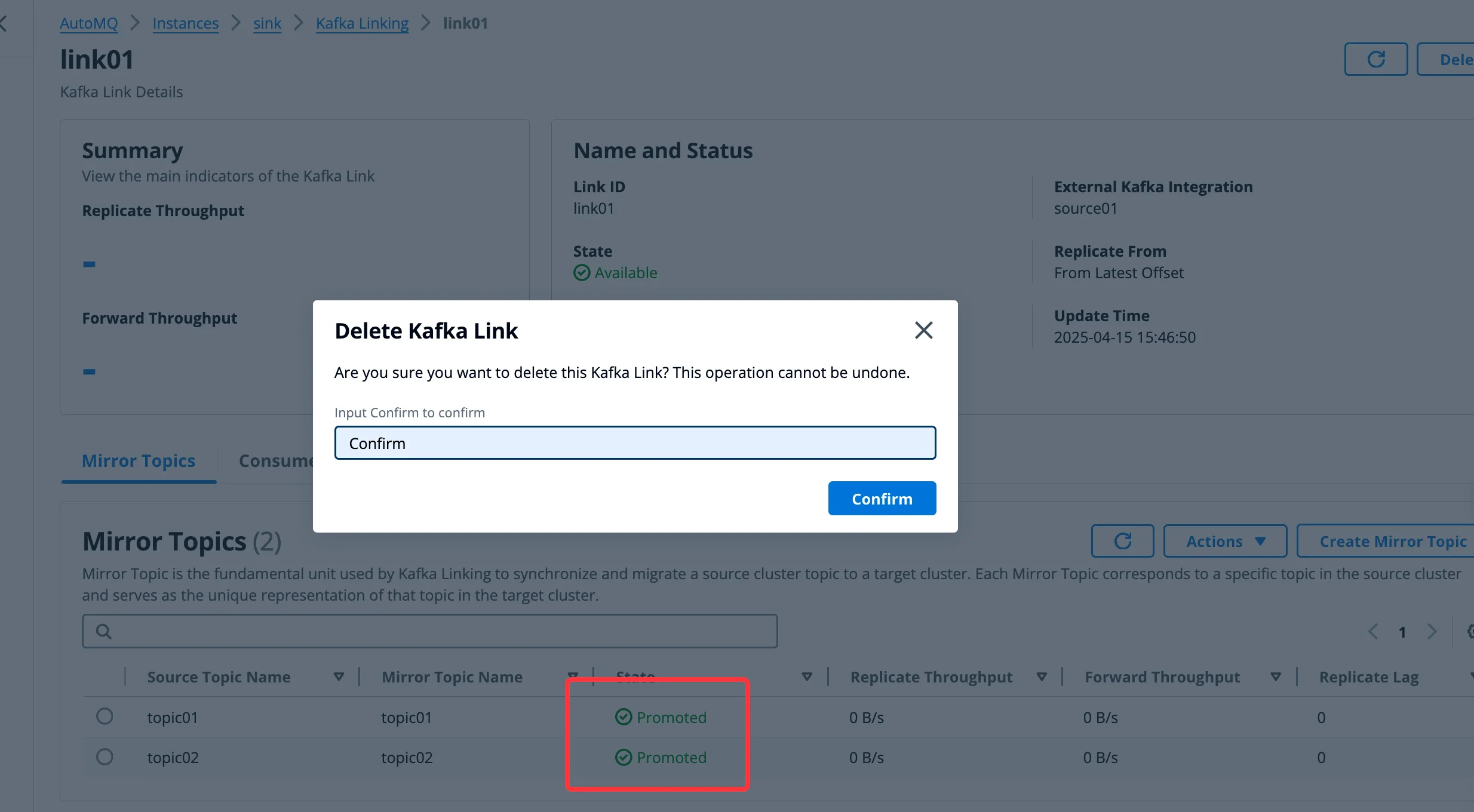
Once all Mirror Topics within Kafka Link have completed migration and promotion as described in Step 2, the migration task is complete, and Kafka Link can be deleted.
**Operations steps:**
* After the Consumer switch is completed, it is recommended to monitor for a certain period to ensure that Producer and Consumer applications are running as expected.
* Once confirmed, in the AutoMQ console, click on "Promote Mirror Topic" and stop traffic proxy and replication.
**Prerequisites for Promoting Mirror Topics:**
All producers have been migrated.
All consumer groups have been migrated.
**Expected Outcome:**
* All read and write operations for mirror topics are centralized in the target cluster, without proxying back to the source cluster.
**Rollback Operation:**
* If the message data in the target cluster exceeds that of the source cluster after promoting the Mirror Topic, you should be cautious about data inconsistencies during the rollback.
### Step 3: Migration complete, delete Kafka Link
Once all Mirror Topics within Kafka Link have completed migration and promotion as described in Step 2, the migration task is complete, and Kafka Link can be deleted.