> ## Documentation Index
> Fetch the complete documentation index at: https://docs.automq.com/llms.txt
> Use this file to discover all available pages before exploring further.
# Overview
> AutoMQ reduces Inter-Zone costs with S3-based storage, eliminating Kafka's data transfer traffic across zones while ensuring scalability and cost efficiency.
AutoMQ's S3-based shared storage architecture can help minimize inter-broker and Inter-Zone (AZ) replica replication, as well as client Inter-Zone data read and write traffic. This document outlines how to use AutoMQ to reduce Inter-Zone transmission traffic.
In this document, AZ stands for Availability Zone, specifically referring to a zone provided by cloud service providers in a public cloud environment. Each independent AZ may be supported by a separate data center facility.
## Problem Background
### Apache Kafka Inter-Zone Traffic Analysis
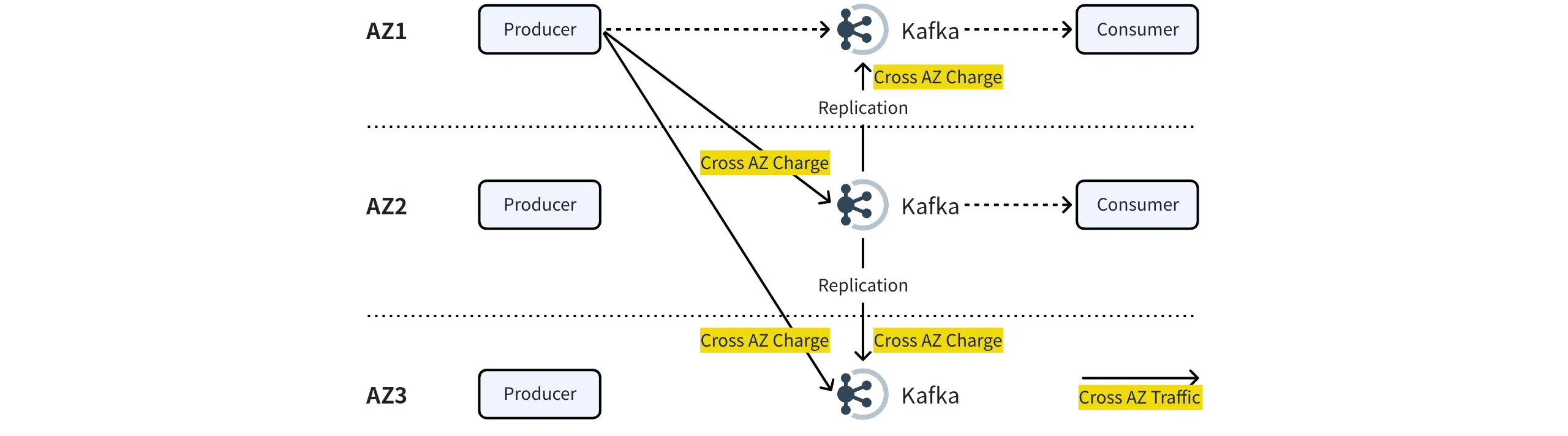
When users deploy Apache Kafka across multiple AZs in AWS or GCP cloud environments, enabling multi-AZ service disaster recovery also introduces Inter-Zone data transmission costs. In large-scale clusters, these traffic costs can account for **60-70%**.
* **Inter-Zone Production Traffic**: If the Producer has not specified a ShardingKey, and partitions are distributed equally across cluster nodes, at least two-thirds of the Producer's traffic will traverse across AZs. For instance, Producers located in AZ1 will route one-third of their traffic to both AZ2 and AZ3.
* **Server-Side Inter-Zone Replication Traffic**: After messages reach the Kafka Broker, it ensures high reliability by replicating the data to Brokers situated in different AZs, effectively doubling the Inter-Zone traffic generated by the Produce operation.
* **Inter-Zone Consumption Traffic**: Consumers have the option to configure client.rack to consume partitions/replicas within the same AZ, thus preventing the generation of Inter-Zone traffic.
 ### AutoMQ Eliminates Inter-Zone Data Transfer
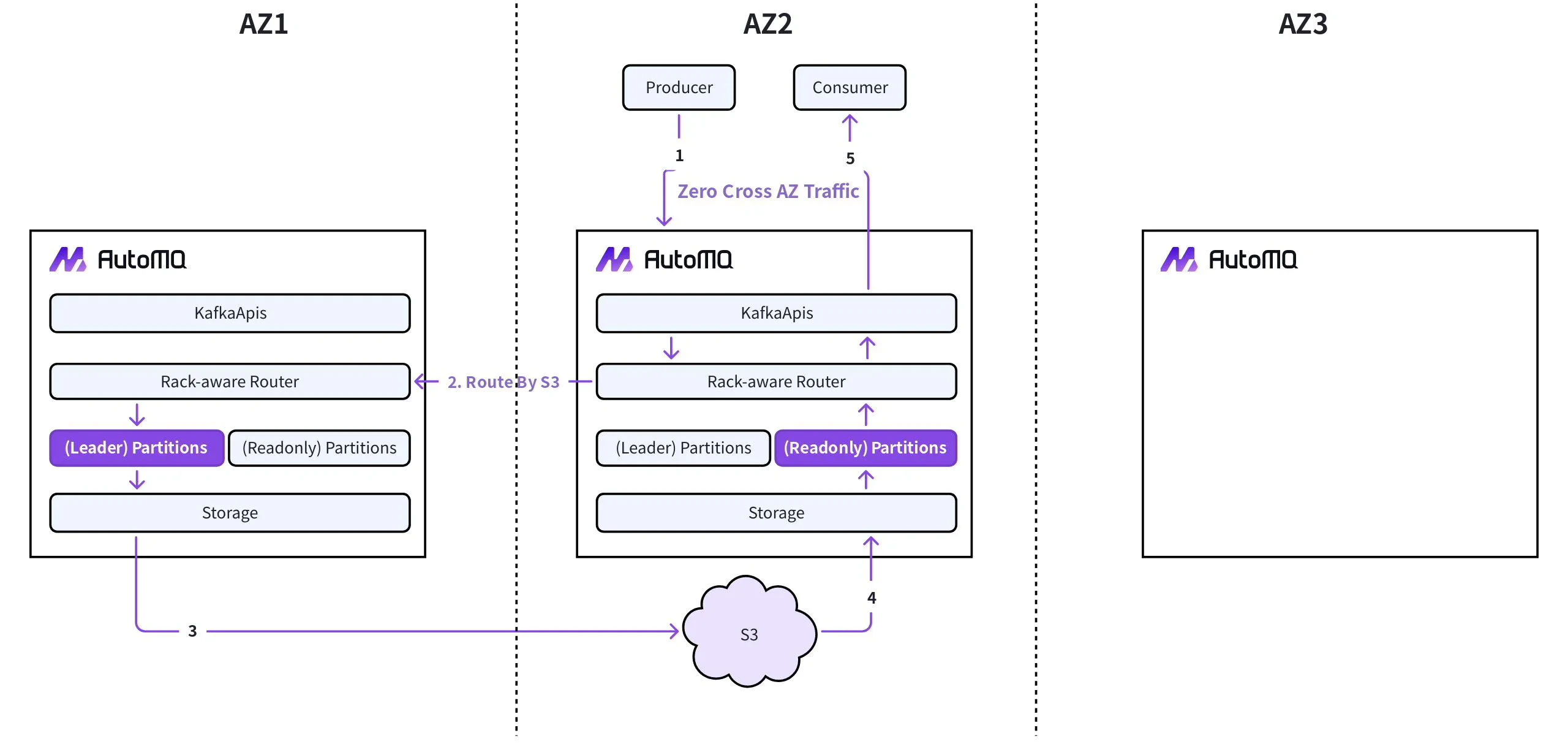
AutoMQ utilizes an architecture that separates storage and compute by leveraging S3, resulting in zero Inter-Zone traffic costs based on S3:
* Production Traffic: AutoMQ's built-in Proxy layer intercepts and identifies Produce requests that cross Availability Zones (AZs). It establishes Inter-Zone proxy channels based on S3, forwarding these Produce requests to the actual partition Leader. Producers only need to communicate with Broker nodes within the same AZ, thus avoiding Inter-Zone traffic costs.
* Replication Traffic: AutoMQ leverages S3 as a shared storage layer, with S3 utilizing erasure coding to create multiple replicas across various AZs. Consequently, no Apache Kafka replication traffic occurs between AutoMQ Broker nodes.
* Consumption Traffic: Besides the Leader partition, AutoMQ establishes a read-only partition in each additional AZ. These read-only partitions directly access data written by the Leader partition from S3 on-demand. Therefore, consumers only need to communicate with the Leader partition or a read-only partition within the same AZ, avoiding any Inter-Zone traffic costs.
### AutoMQ Eliminates Inter-Zone Data Transfer
AutoMQ utilizes an architecture that separates storage and compute by leveraging S3, resulting in zero Inter-Zone traffic costs based on S3:
* Production Traffic: AutoMQ's built-in Proxy layer intercepts and identifies Produce requests that cross Availability Zones (AZs). It establishes Inter-Zone proxy channels based on S3, forwarding these Produce requests to the actual partition Leader. Producers only need to communicate with Broker nodes within the same AZ, thus avoiding Inter-Zone traffic costs.
* Replication Traffic: AutoMQ leverages S3 as a shared storage layer, with S3 utilizing erasure coding to create multiple replicas across various AZs. Consequently, no Apache Kafka replication traffic occurs between AutoMQ Broker nodes.
* Consumption Traffic: Besides the Leader partition, AutoMQ establishes a read-only partition in each additional AZ. These read-only partitions directly access data written by the Leader partition from S3 on-demand. Therefore, consumers only need to communicate with the Leader partition or a read-only partition within the same AZ, avoiding any Inter-Zone traffic costs.
 ## Configuration Documentation
To eliminate Inter-Zone data transfer using AutoMQ's Inter-Zone data routing feature, configuration must be enabled on both the server and client sides. The relevant configuration documentation is as follows:
* [Broker Configuration▸](/automq/eliminate-inter-zone-traffics/broker-configuration)
* [Client Configuration▸](/automq/eliminate-inter-zone-traffics/client-configuration)
After configuration is complete, you can conduct data sending and receiving tests, and refer to the [Monitor Inter Zone Traffic▸](/automq/eliminate-inter-zone-traffics/monitor-inter-zone-traffic) document to observe the actual inter-availability zone traffic generated.
## Configuration Documentation
To eliminate Inter-Zone data transfer using AutoMQ's Inter-Zone data routing feature, configuration must be enabled on both the server and client sides. The relevant configuration documentation is as follows:
* [Broker Configuration▸](/automq/eliminate-inter-zone-traffics/broker-configuration)
* [Client Configuration▸](/automq/eliminate-inter-zone-traffics/client-configuration)
After configuration is complete, you can conduct data sending and receiving tests, and refer to the [Monitor Inter Zone Traffic▸](/automq/eliminate-inter-zone-traffics/monitor-inter-zone-traffic) document to observe the actual inter-availability zone traffic generated.