> ## Documentation Index
> Fetch the complete documentation index at: https://docs.automq.com/llms.txt
> Use this file to discover all available pages before exploring further.
# Table Topic 和 AWS Glue 集成
> Integrate AutoMQ Table Topic with AWS Glue for scalable data streaming into Iceberg without ETL. Achieve real-time data lake analytics with cloud-native efficiency.
AutoMQ Table Topic 支持和 Iceberg 集成实现流式数据入湖分析和查询,免除 ETL 的配置和运维。本文介绍如何在 AWS 环境配置 Table Topic 和 Glue 的集成。
## 前置条件
AWS 环境使用 AutoMQ Table Topic 功能,需要满足如下条件:
* **版本约束:** 要求 AutoMQ 实例版本 >= 1.4.1。
* **实例约束:** 必须在创建 AutoMQ 实例时开启 Table Topic 特性,后续才可使用 Table Topic。实例一旦创建完成,后续无法再开启 Table Topic 功能。
* **资源要求:** 在 AWS 上使用 Table Topic,可以使用 AWS Glue 作为 Data Catalog,也可以使用 AWS S3 Tablebucket 作为 Data Catalog。
## 操作步骤
### 步骤 1:准备数据湖 Bucket
使用 Glue Catalog 时,数据湖的表需要存储到 S3 Bucket。建议提前在目标地域创建可用的 Bucket,用于长期存储 Iceberg 表数据。
### 步骤 2:创建 AutoMQ 实例,开启 Table Topic 功能
使用 AutoMQ Table Topic 功能需要在创建实例时提前开启,后续才可实现数据流式入湖。因此创建实例时需要参考下方说明配置:
1. 开启 Table Topic。
2. Catalog 类型选择 **Glue**。
3. 设置 Glue Catalog 使用的 S3 Bucket,建议选择步骤 1 中提前准备的数据湖 Bucket。
**注意:**
AutoMQ 实例开启 Table Topic 后,并非所有 Topic 都会默认开启流转表,仍然需要按 Topic 粒度按需配置实现流式数据入湖。
如需使用 Table Topic,必须在创建实例时提前开启 Table Topic。实例一旦创建,即无法更改此配置。
 ### 步骤 3:创建 Topic,并配置流转表
AutoMQ 实例开启 Table Topic 功能后,即可在创建 Topic 时按需配置流转表。具体操作如下:
1. 进入步骤 2 的实例,Topic 列表,点击**创建 Topic** 。
2. 创建 Topic 的配置中,开启 Table Topic 转换,并配置如下参数:
1. **命名空间:** 命名空间用于隔离不同的 Iceberg 表,对应 Data Catalog 中的 Database。建议根据业务归属设置相应的参数值。
2. **Schema 约束类型:** 设置 Topic 消息是否遵守 Schema 约束。如果选择**Schema** 则启用 Schema 约束,需要向 AutoMQ 内置 SchemaRegistry 注册消息 Schema,后续发送消息时严格按照 Schema,后续 Table Topic 会使用该 Schema 的字段填充 Iceberg 表;如果选择**Schemaless** ,则代表消息内容无明确 Schema 约束,此时会将消息 Key 和 Value 作为整体字段填充 Iceberg 表。
### 步骤 3:创建 Topic,并配置流转表
AutoMQ 实例开启 Table Topic 功能后,即可在创建 Topic 时按需配置流转表。具体操作如下:
1. 进入步骤 2 的实例,Topic 列表,点击**创建 Topic** 。
2. 创建 Topic 的配置中,开启 Table Topic 转换,并配置如下参数:
1. **命名空间:** 命名空间用于隔离不同的 Iceberg 表,对应 Data Catalog 中的 Database。建议根据业务归属设置相应的参数值。
2. **Schema 约束类型:** 设置 Topic 消息是否遵守 Schema 约束。如果选择**Schema** 则启用 Schema 约束,需要向 AutoMQ 内置 SchemaRegistry 注册消息 Schema,后续发送消息时严格按照 Schema,后续 Table Topic 会使用该 Schema 的字段填充 Iceberg 表;如果选择**Schemaless** ,则代表消息内容无明确 Schema 约束,此时会将消息 Key 和 Value 作为整体字段填充 Iceberg 表。
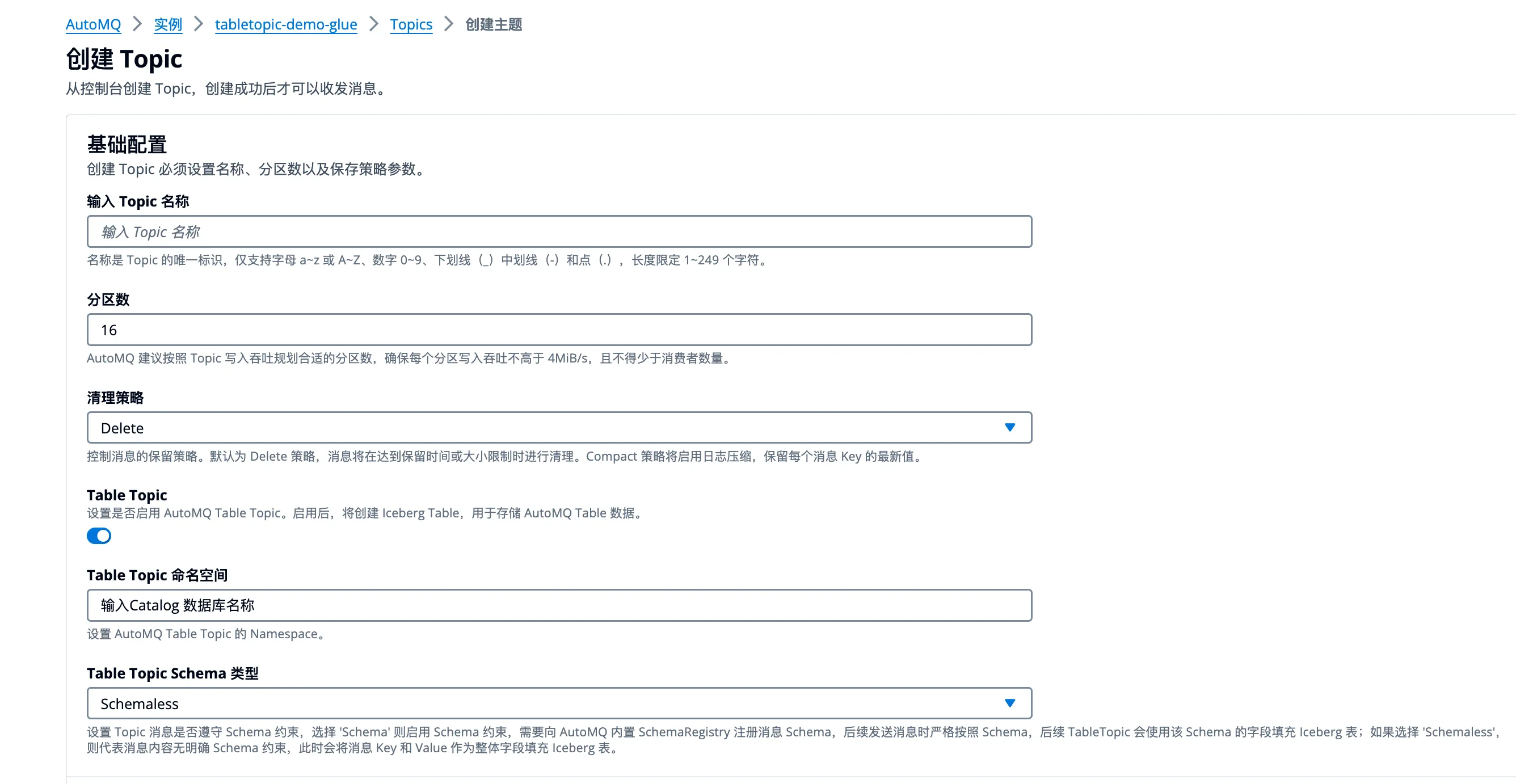 1. **点击确定** ,创建支持流转表的 Topic。
### 步骤 4: 生产消息,并实时查询 Iceberg 表数据
完成 AutoMQ 实例配置以及 Table Topic 创建后,即可测试生产数据,并在 Iceberg 表查询数据。
1. 点击进入 Topic 详情,生产消息 Tab,输入测试的消息 Key 和消息 Value,发送消息。
2. 前往[ AWS Glue 控制台](https://ap-southeast-1.console.aws.amazon.com/glue/home),查看 AutoMQ 写入的 Iceberg 数据库和表。
1. **点击确定** ,创建支持流转表的 Topic。
### 步骤 4: 生产消息,并实时查询 Iceberg 表数据
完成 AutoMQ 实例配置以及 Table Topic 创建后,即可测试生产数据,并在 Iceberg 表查询数据。
1. 点击进入 Topic 详情,生产消息 Tab,输入测试的消息 Key 和消息 Value,发送消息。
2. 前往[ AWS Glue 控制台](https://ap-southeast-1.console.aws.amazon.com/glue/home),查看 AutoMQ 写入的 Iceberg 数据库和表。
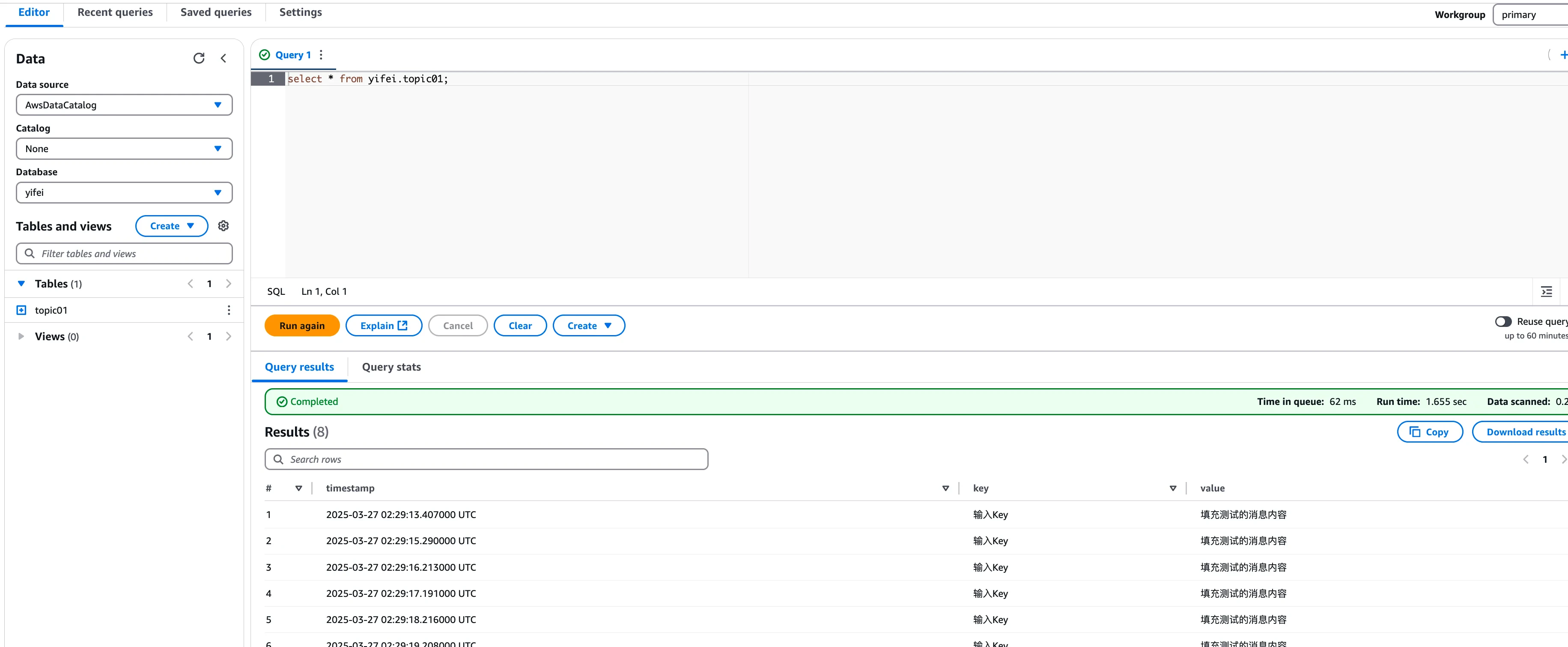
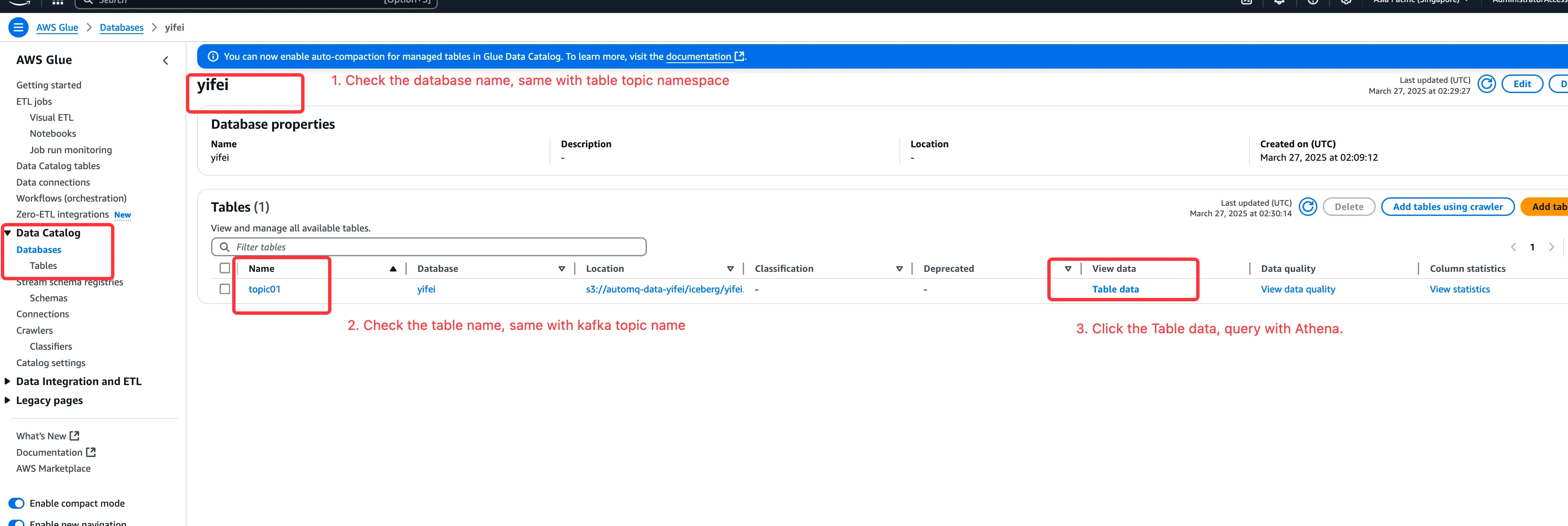 1. **点击 View Data** ,启用 AWS Athena 查询 Glue 中的表数据,可以看到 AutoMQ 实时将 Kafka 消息转换成对应数据表的数据记录。用户也可以使用其他查询引擎进行分析和计算。