> ## Documentation Index
> Fetch the complete documentation index at: https://docs.automq.com/llms.txt
> Use this file to discover all available pages before exploring further.
# 概述
> AutoMQ’s Table Topic offers seamless Iceberg integration for real-time data lake analytics without ETL. Enjoy automatic scalability and cost-efficient AWS S3 integration.
AutoMQ Table Topic 提供了一站式 Iceberg 集成,实现流式数据入湖分析和查询。本文介绍 Table Topic 功能的技术架构、原理和相关核心概念。
## 架构和优势
AutoMQ Table Topic 功能通过内置的流转表架构实现一站式数据实时入湖和查询分析,其技术架构如下:
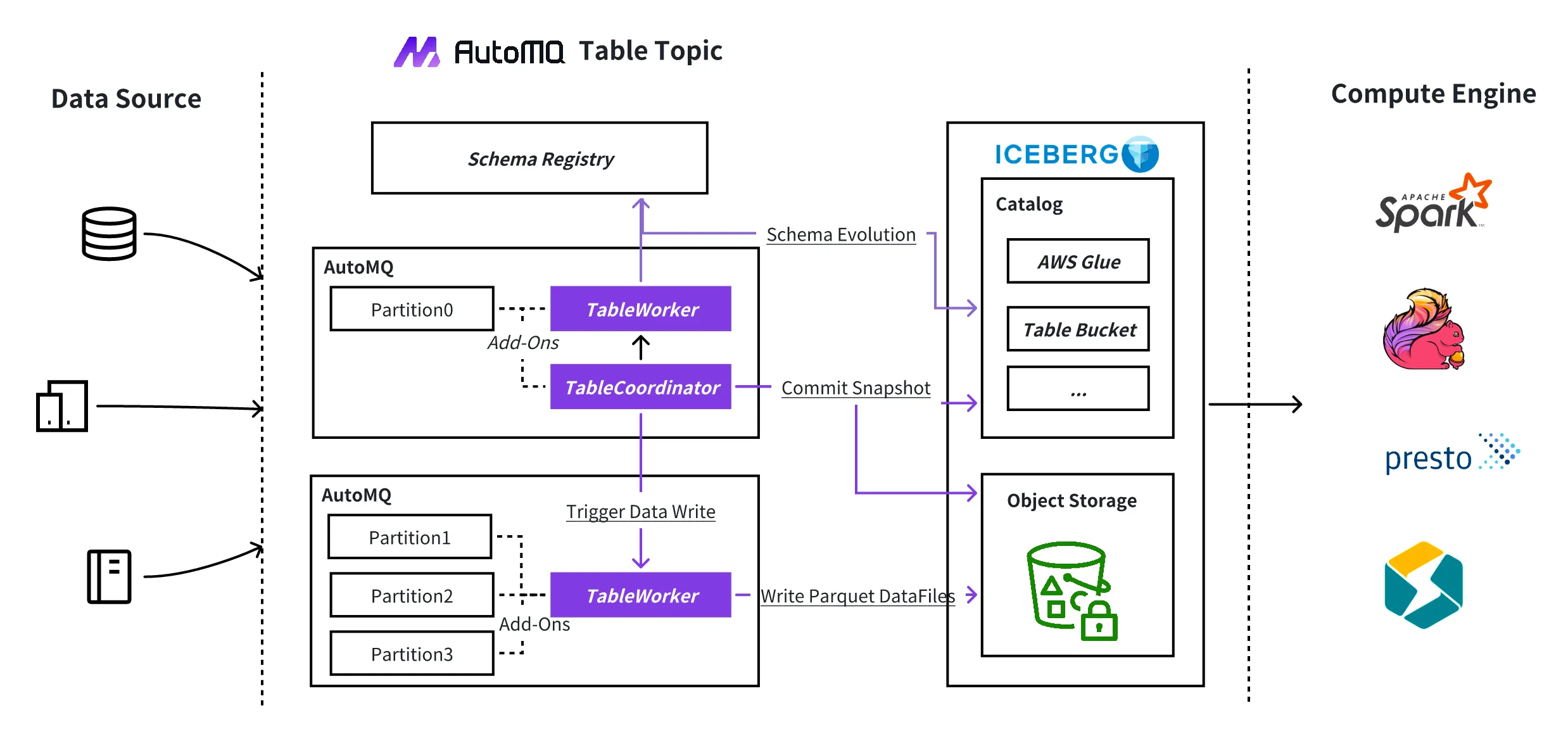 Table Topic 相比传统的 ETL 数据入湖方案,具有如下优势:
* **开箱即用:** 只需一次点击,即可启用 AutoMQ Table Topic,轻松将数据流入 Iceberg 表,实现连续的、实时的分析。
* **免 ETL(提取、转换、加载):** 传统的数据湖摄取方法通常需要使用 Kafka Connect 或 Flink 等工具作为中介。Table Topic 消除了这种 ETL 管道,大大降低了成本和操作复杂性。
* **自动扩展:** AutoMQ 本身是一个无状态且弹性的架构,允许代理无缝扩展或缩减,分区可以动态重新分配。Table Topic 充分利用这一框架,轻松处理从数百 MiB/s 到数 GiB/s 的数据摄取速率。
* **无缝集成 AWS S3 Table:** Table Topic 无缝集成 S3 Table,利用其 Data Catalog 和维护功能,如压缩、快照管理和未引用文件删除。此集成还通过 AWS Athena 促进了大规模数据分析。
## 约束和限制
使用 AutoMQ Table Topic 功能,需要满足如下条件:
* **版本约束:** 要求 AutoMQ 版本 >= 1.5。
* **功能约束:** 必须在部署 AutoMQ 集群时配置 Table Topic 特性,后续才可使用 Table Topic。集群一旦部署完成,后续无法再开启 Table Topic 功能。
* **Catalog 要求:** 使用 Table Topic,需要用户提供外置可用的 Data Catalog 服务。目前 AutoMQ 支持如下 Catalog 类型:
* **AWS S3Table Catalog:** AWS S3 提供了新的 Table Bucket,内置了 Catalog 管理和数据湖存储。
* **AWS Glue Catalog:** AWS Glue 提供了云上统一的 Catalog 管理,支持集成到 Athena 等查询工具。
* **Hive Catalog:** 用户可自己基于 Hadoop 生态的 Hive Metastore 提供 Catalog 支持,也可以购买云厂商托管的 EMR HMS 服务。
## 使用流程
用户使用 AutoMQ Table Topic 功能需要按照如下流程进行配置:
Table Topic 相比传统的 ETL 数据入湖方案,具有如下优势:
* **开箱即用:** 只需一次点击,即可启用 AutoMQ Table Topic,轻松将数据流入 Iceberg 表,实现连续的、实时的分析。
* **免 ETL(提取、转换、加载):** 传统的数据湖摄取方法通常需要使用 Kafka Connect 或 Flink 等工具作为中介。Table Topic 消除了这种 ETL 管道,大大降低了成本和操作复杂性。
* **自动扩展:** AutoMQ 本身是一个无状态且弹性的架构,允许代理无缝扩展或缩减,分区可以动态重新分配。Table Topic 充分利用这一框架,轻松处理从数百 MiB/s 到数 GiB/s 的数据摄取速率。
* **无缝集成 AWS S3 Table:** Table Topic 无缝集成 S3 Table,利用其 Data Catalog 和维护功能,如压缩、快照管理和未引用文件删除。此集成还通过 AWS Athena 促进了大规模数据分析。
## 约束和限制
使用 AutoMQ Table Topic 功能,需要满足如下条件:
* **版本约束:** 要求 AutoMQ 版本 >= 1.5。
* **功能约束:** 必须在部署 AutoMQ 集群时配置 Table Topic 特性,后续才可使用 Table Topic。集群一旦部署完成,后续无法再开启 Table Topic 功能。
* **Catalog 要求:** 使用 Table Topic,需要用户提供外置可用的 Data Catalog 服务。目前 AutoMQ 支持如下 Catalog 类型:
* **AWS S3Table Catalog:** AWS S3 提供了新的 Table Bucket,内置了 Catalog 管理和数据湖存储。
* **AWS Glue Catalog:** AWS Glue 提供了云上统一的 Catalog 管理,支持集成到 Athena 等查询工具。
* **Hive Catalog:** 用户可自己基于 Hadoop 生态的 Hive Metastore 提供 Catalog 支持,也可以购买云厂商托管的 EMR HMS 服务。
## 使用流程
用户使用 AutoMQ Table Topic 功能需要按照如下流程进行配置:
