

Migration plan
Using Kafka Linking to migrate from Apache Kafka® to AutoMQ, the following tasks should be considered:- Message data synchronization: Kafka stores historical data of both consumed and unconsumed messages. Migrating clusters must ensure that message data is replicated to the new cluster as needed, without losing any messages.
- Producer switching: In addition to data synchronization, the migration process requires switching producer applications at an appropriate time so that producers connect to the target cluster to produce new messages.
- Consumer switching: In addition to data synchronization, the migration process requires switching consumer applications at an appropriate time so that consumers connect to the target cluster and continue consuming messages from the previous consumption progress.
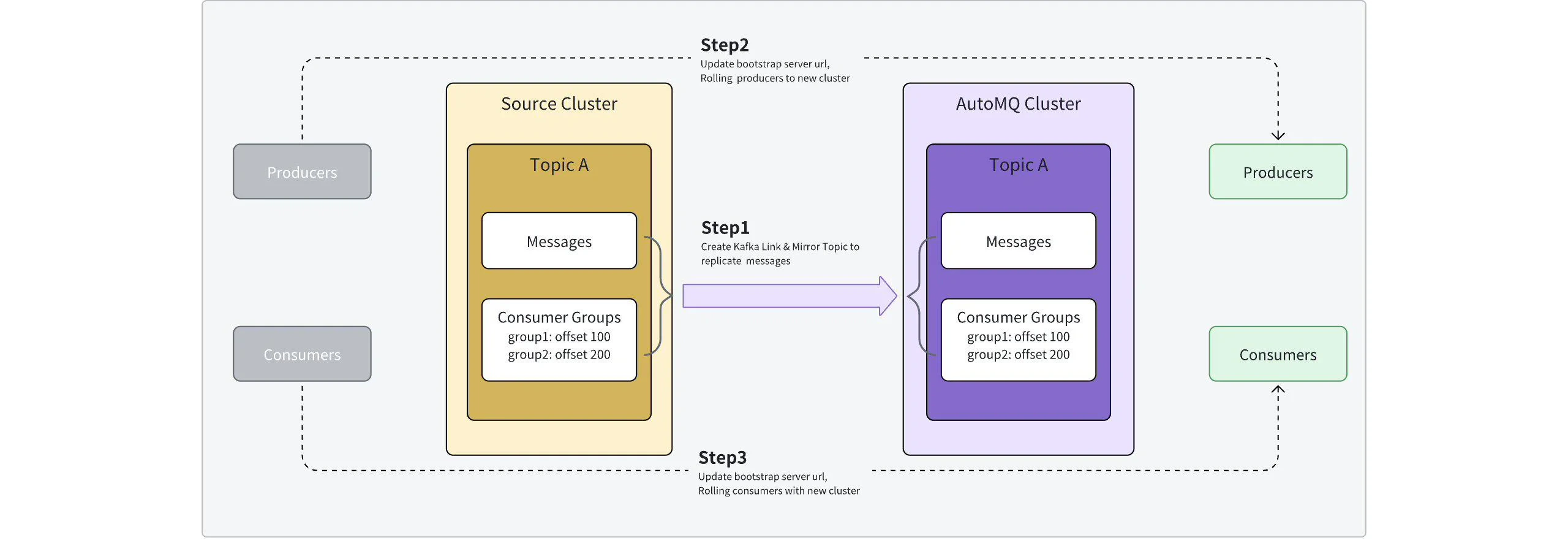
Steps
Step 1: Create a Kafka Link and start synchronizing data
After completing the Prerequisites▸, the source cluster, target cluster, and the scope of Topics and Consumer Groups to be migrated have been clearly defined. The next step is to start creating the migration task. Create a Kafka Link by clicking on Target Instance >> Kafka Links and filling in the relevant parameters as guided.
The console builds the candidate lists from the source cluster’s Kafka APIs. After you enter a search keyword, the console matches resource names by containment. For example,
order matches prod-order-v1. Each search displays up to 100 matching resources. The following filters also apply:
- Source Topic: Includes Topics visible to the Kafka Linking source identity that are not identified as internal Topics. Excludes Topics marked as internal in Kafka metadata and Topic names that start with
__or., or end with-internalor.internal. - Source Consumer Group: Includes Groups visible to the Kafka Linking source identity whose
protocolTypeisconsumeror empty and whose Group IDs do not match a product-internal prefix. Excludes other protocol types, such asconnectused by Kafka Connect orconnectorreported by some implementations. It also excludes product-internal Groups whose IDs start withsys-cmporkarapace-autogenerated.
If the target instance already contains a Topic with the same name as a selected Source Topic, Kafka Linking cannot create the corresponding Mirror Topic. Resolve the naming conflict before adding that Source Topic to the Kafka Link.
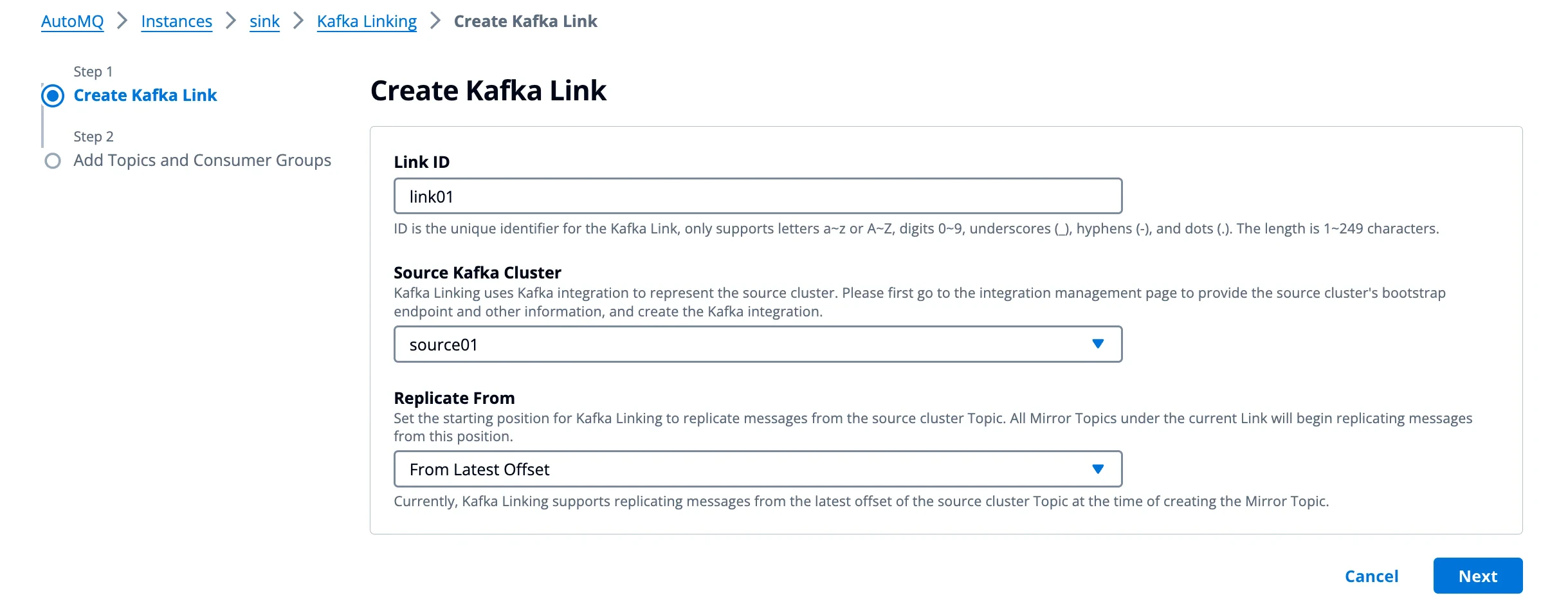
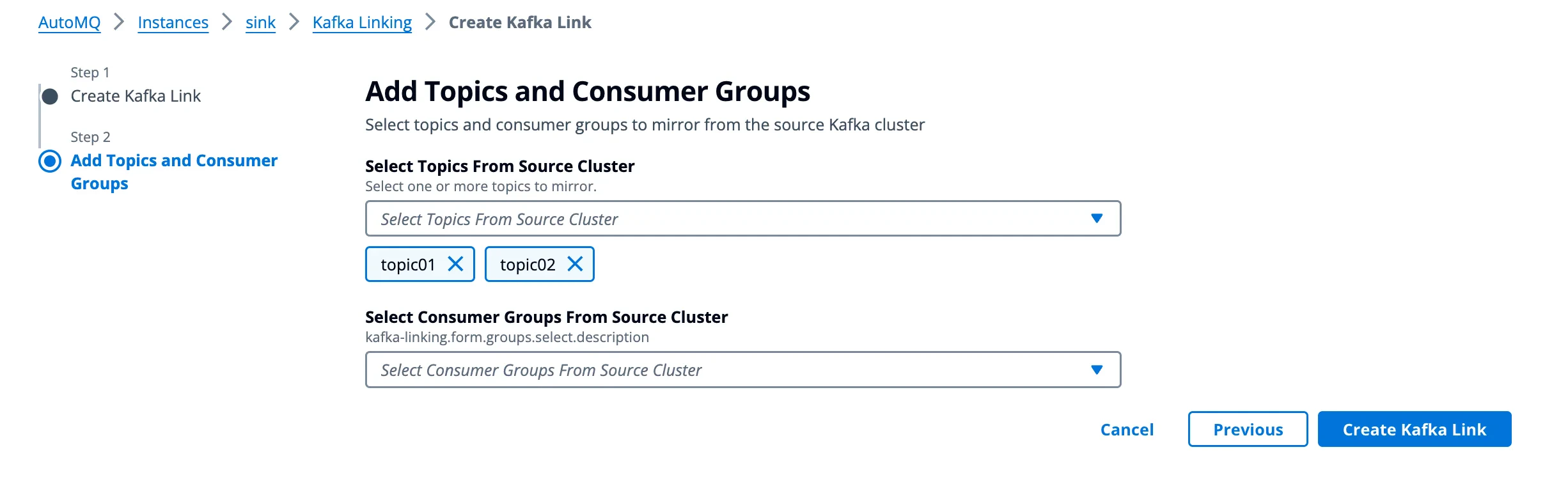
If you delete Mirror Topics or Consumer Groups in Kafka Link, the corresponding Topics and Consumer Groups will be deleted from the target cluster (AutoMQ instance). This operation cannot be undone; you will need to recreate them afterward.
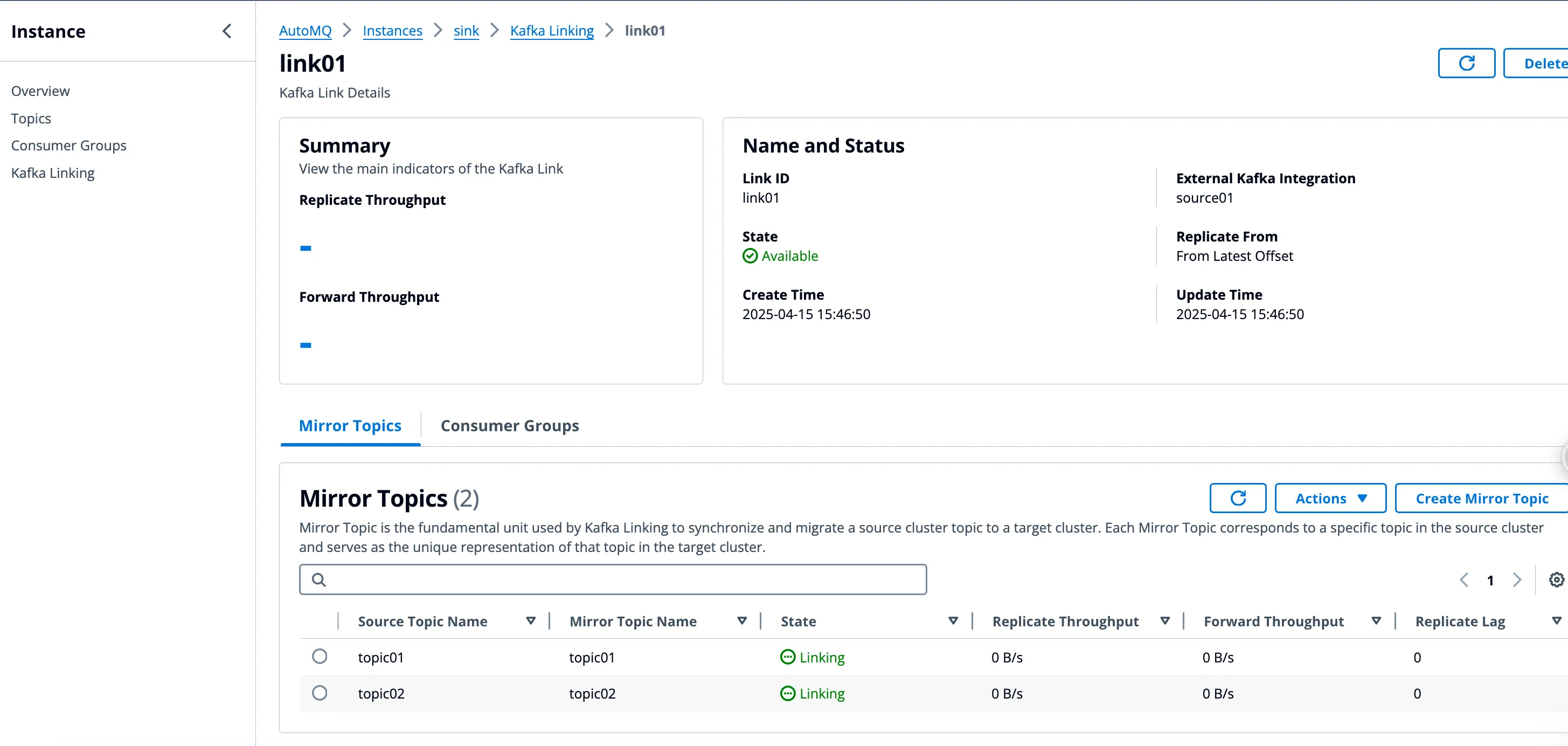
Step 2: Switch producers and consumers, execute migration process
When the Kafka Link is created, users need to update the Producer and Consumer configurations, switching the Producer and Consumer from the source cluster to the target cluster. This mainly involves the following three operations:- Producer Cutover: Update the producer’s access parameters to point to the target cluster.
- Consumer Cutover: Update the consumer’s access parameters to point to the target cluster.
- Promote Mirror Topic Status: In the AutoMQ console, select the Mirror Topic for status promotion. The promotion operation essentially controls the Kafka Linking component to stop proxying Producer write traffic and replicating data from the source cluster.
Phase 1: Switch the producer to the target cluster
During the migration process, first switch the Producer’s access configuration so that the Producer connects to the target cluster (AutoMQ instance). The traffic topology during the switching process is shown in the figure below: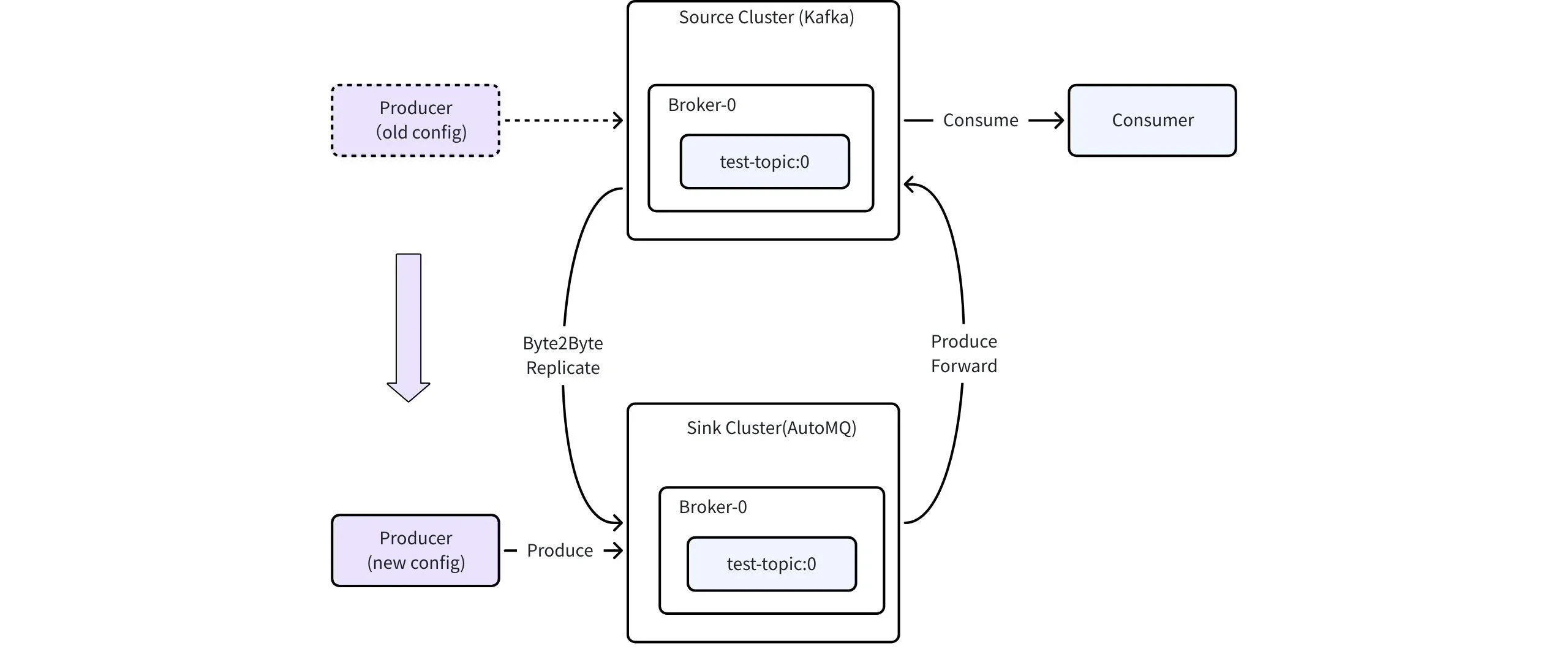
- The producer updates the access parameters in batches and restarts the application, redirecting the production traffic to the designated AutoMQ instance.
- Production traffic is migrated to the target instance in phases, ensuring no downtime or disruption in production traffic.
- Consumers in the source cluster continue to consume all messages without interruption.
- Messages in the source cluster are synchronized to AutoMQ using replication tasks.
- Producer rollback configuration: switch back to the source cluster.
Phase 2: Switch the consumer to the target cluster
The second stage involves switching the Consumer’s access configuration, allowing the Consumer to connect to the target cluster (AutoMQ instance). The traffic topology during the switch is shown in the figure below: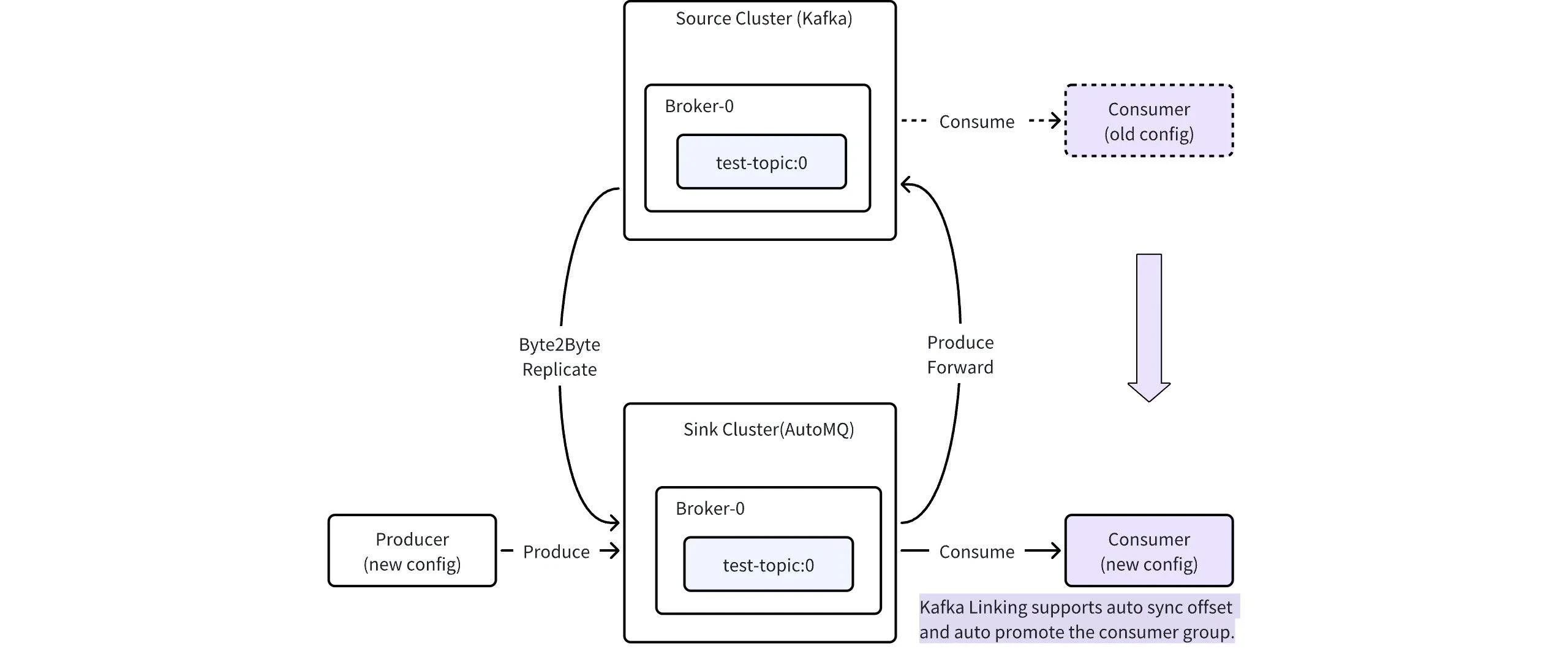
- Consumers update their connection parameters and use a rolling deployment so that instances gradually connect to the AutoMQ instance.
-
For standard Consumers that participate in Group management by using
subscribeandgroup.id, instances moved to the target cannot receive partition assignments or start consuming while the target Mirror Group isLINKING. As source instances leave in batches, the remaining source instances must carry the full consumption workload. Control the rollout batch size and monitor source processing capacity and lag. - After every source Consumer instance exits, the data plane detects that the source Group has no active members and automatically promotes the Consumer Group. The data plane schedules registered Groups every 10 seconds. If the source Group still had active members at the previous check, the same Group is checked again after a default minimum interval of 30 seconds.
-
A brief consumption pause exists until Consumer Group promotion, target rebalance, and partition assignment complete. Wait for the Group to enter
PROMOTED, then confirm that target Consumers have assignments and their consumption progress is advancing.
Before switching Consumers, the following conditions should be metFor every partition, confirm that the Consumer’s actual startup offset is within the readable range of the current Topic on the AutoMQ instance:For example, if a Consumer’s actual startup offset for Partition X is 100, it can cut over when the target readable range is
[80, 150]. A range of [120, 150] means that the historical record at offset 100 is no longer readable. A range of [80, 90] means that the target has not replicated through offset 100, so wait for the target to catch up.The actual startup offset can come from a committed Kafka Consumer Group offset, a Flink checkpoint or savepoint, or application-managed storage. See Kafka Linking best practices for the validation procedure.- Production traffic remains in the same state as the previous phase, continuing to proxy back to the source cluster and synchronize to the target cluster.
- The Consumer Group will continue to consume from the offsets of the source cluster and will not be affected.
- For the consumer rollback configuration, switch back to the source cluster.
Since the consumption offsets of the source cluster will not be updated automatically, it is recommended to reset the offsets before rolling back to avoid potential duplicate consumption.
Phase 3: Promote Mirror Topic status
Once all Producers and Consumers have successfully switched and are functioning as expected, you can elevate the status of the Mirror Topic, stop the traffic proxy, and synchronization.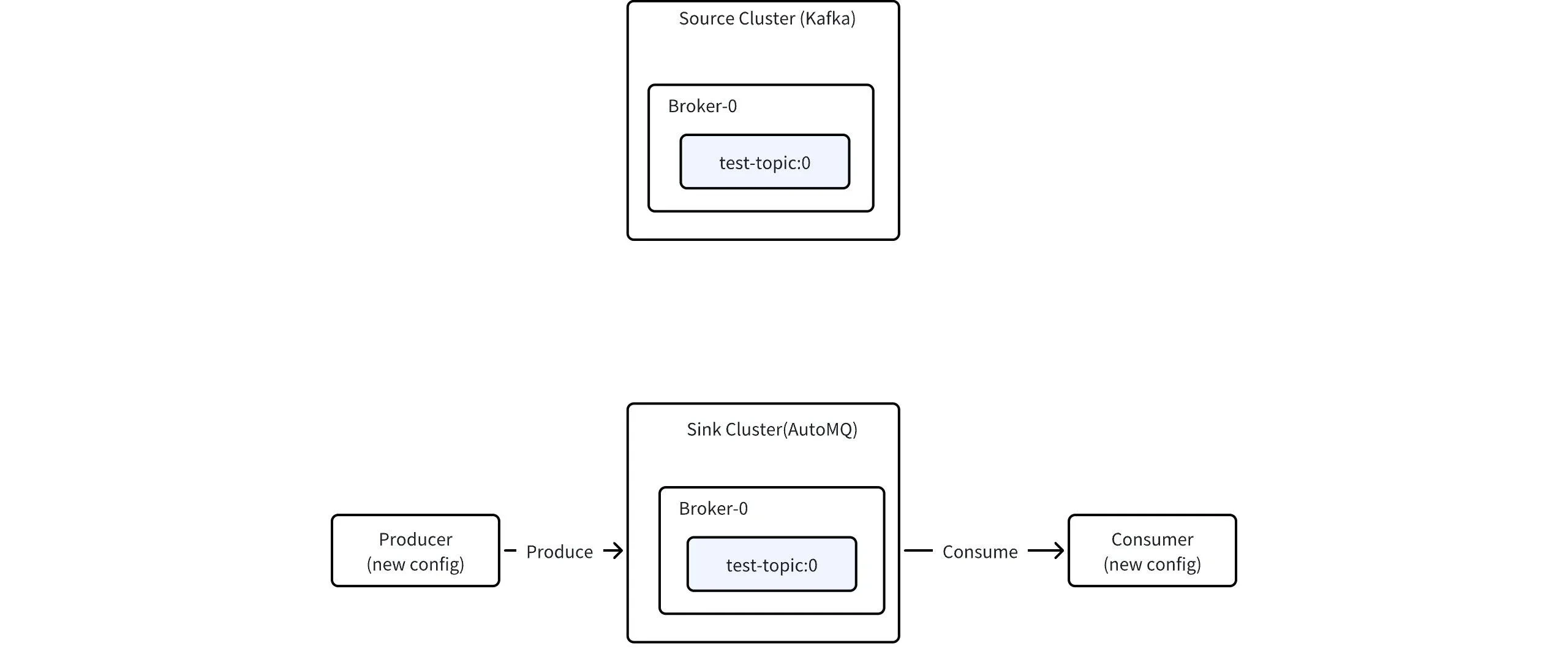
- After the Consumer switch is completed, it is recommended to monitor for a certain period to ensure that Producer and Consumer applications are running as expected.
- Once confirmed, in the AutoMQ console, click on “Promote Mirror Topic” and stop traffic proxy and replication.
Prerequisites for Promoting Mirror Topics:
-
Every standard Producer instance connects to the target AutoMQ instance, and no workload Producer still writes directly through a source-cluster endpoint. Kafka Linking itself remains connected to the source during
LINKING, so source-cluster connections alone do not indicate an incomplete workload cutover. - For transactional Producers, source instances have stopped, transactions have ended, the target has caught up, and target transactional Producers have not started.
- Every Consumer instance connects to the target, the source Consumer Group has no active members, Consumer Group promotion is complete, and target consumers are stable.
- Replication lag has converged, no sustained network, authentication, or request errors remain, and the post-promotion rollback and reconciliation plan is recorded.
- All read and write operations for mirror topics are centralized in the target cluster, without proxying back to the source cluster.
- If the message data in the target cluster exceeds that of the source cluster after promoting the Mirror Topic, you should be cautious about data inconsistencies during the rollback.
Step 3: Migration complete, delete Kafka Link
After every Mirror Topic and Consumer Group in the Kafka Link is promoted, and production, consumption, and critical business results on the target pass acceptance and the observation window, delete the Kafka Link itself. Deleting the Kafka Link marks the migration as fully complete.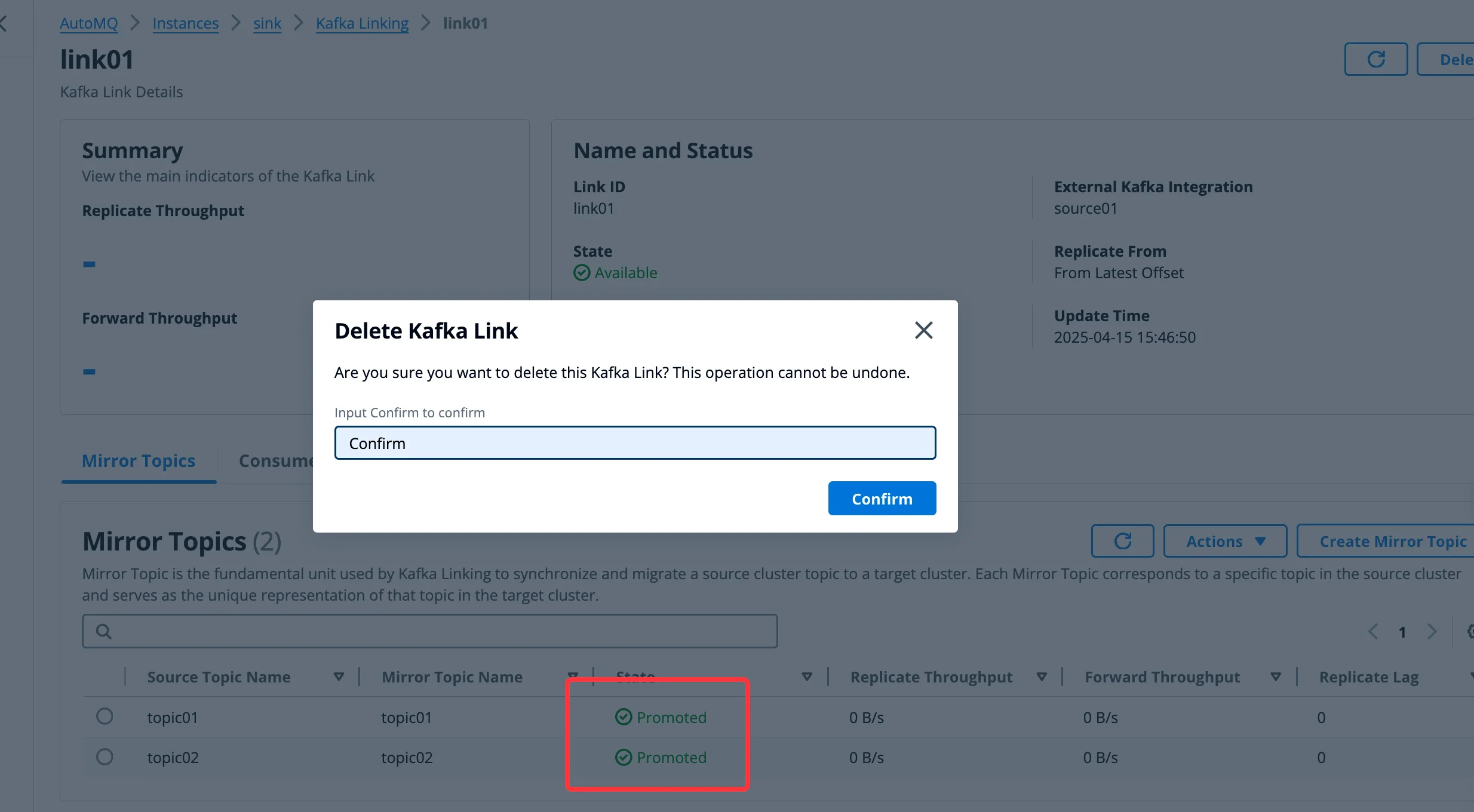
To complete the migration, delete only the Kafka Link itself. Do not delete promoted Mirror Topics or Consumer Groups from the Kafka Link; doing so deletes the corresponding topic or Group from the target AutoMQ instance.