

Architecture and Advantages
AutoMQ Table Topic enables real-time data lake ingestion and query analysis through its embedded streaming table architecture. The technical architecture is outlined below: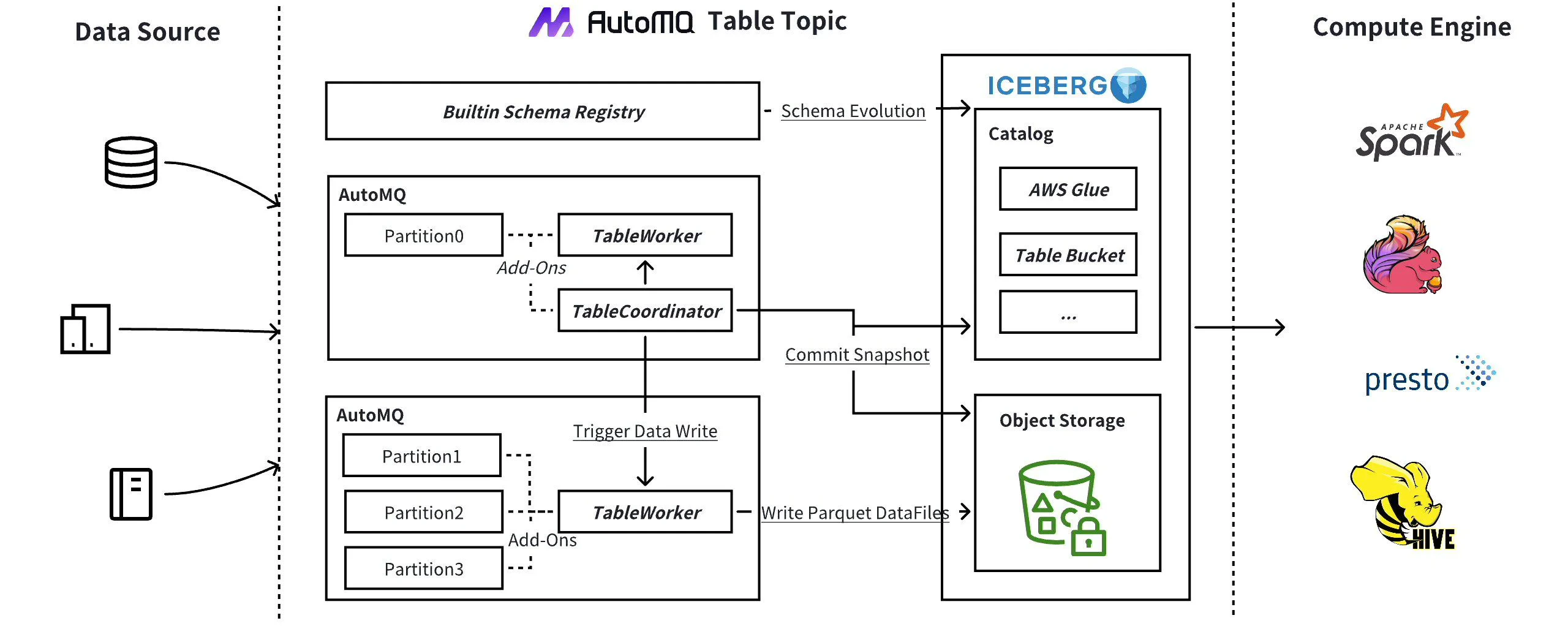
- Out of the Box: With just one click, you can activate AutoMQ Table Topic to stream data into Iceberg tables for continuous, real-time analytics.
- Built-in Schema Registry: The built-in Kafka Schema Registry is ready to use. Table Topic leverages registered schemas to automatically create Iceberg tables in your catalog services (e.g., AWS Glue) and supports automatic schema evolution.
- ETL-Free (Extract, Transform, Load): Traditional data lake ingestion methods often require intermediary tools such as Kafka Connect or Flink. Table Topic eliminates such ETL pipelines, significantly reducing costs and operational complexity.
- Auto Scaling: AutoMQ features a stateless and elastic architecture that allows brokers to scale up or down with dynamic partition reassignment. Table Topic leverages this framework to handle ingestion rates from hundreds of MiB/s to several GiB/s.
- AWS S3 Table Integration: Table Topic integrates with S3 Table, leveraging its Data Catalog and maintenance features such as compression, snapshot management, and unreferenced file deletion. This integration also facilitates large-scale data analytics through AWS Athena.
Constraints and Limitations
Using the AutoMQ Table Topic feature requires meeting the following conditions:- Version Constraint: The AutoMQ instance version must be >= 1.4.1.
-
Catalog Requirement: To use Table Topic, users must provide an external, available Data Catalog service. Currently, AutoMQ supports the following Catalog types:
- AWS S3Table Catalog: AWS S3 offers a new Table Bucket, equipped with built-in catalog management and data lake storage.
- AWS Glue Catalog: AWS Glue provides unified catalog management in the cloud and supports integration with query tools such as Athena.
- Hive Catalog: Customers can provide catalog support themselves based on the Hadoop ecosystem’s Hive Metastore, or they can purchase cloud provider-hosted EMR HMS services.
Workflow
Users need to follow the configuration workflow when using the AutoMQ Table Topic feature as outlined below:- Configure Data Catalog: Select and configure your preferred Data Catalog service (e.g., AWS S3Table Catalog, AWS Glue Catalog, or Hive Catalog).
- Create Instance, Enable Table Topic, and Set Target Catalog: When creating an AutoMQ instance, enable the Table Topic feature and specify the configured Data Catalog.
- Configure Topic to Enable Stream Table Rotation: In the Topic configuration, enable the stream table rotation feature.